
VoiVision Smart Court AI Transcription for Real-Time Hearing Records
An on-premise AI solution for real-time transcription and recording in courtrooms. Based on the VV01/VV05/VV10 proprietary product lines, VoiVision AI provides courtroom speech processing capabilities—namely real-time transcription and speaker diarization—as well as audio‑visual synchronized terminology correction, structured transcript generation, and end‑to‑end audit‑trail functionality. It also details, item by item, the conditions for applicability, exclusionary circumstances, and integration methods under the Supreme People's Court's "Opinions" and the "Regulations on Audio and Video Recording of court Hearings."
1. Scenario and Pain Points

Currently, court hearings are primarily recorded manually: court clerks take handwritten notes in real time during the proceedings and subsequently compile them into official transcripts for the parties to review and sign. The burden of this process is concentrated in three specific stages:
| Stage | Current state | What it costs you |
|---|---|---|
| Recording | The clerk takes handwritten notes throughout the hearing. | The intensive evidence‑presentation phase is fast‑paced and information‑dense; manual note‑taking inevitably involves selective recording, so any omitted details must be recovered by replaying the audio afterward. |
| Organising and checking | Once the transcript is drafted, the whole recording is replayed to proofread it. | The most time-consuming and concentration-draining part of the entire court reporting process |
| Archiving and retrieval | Three separate stores: recordings, paper transcripts and personal devices. | It is difficult to reconstruct the complete sequence of events when filing cases, conducting subsequent reviews, or resolving disputes. |
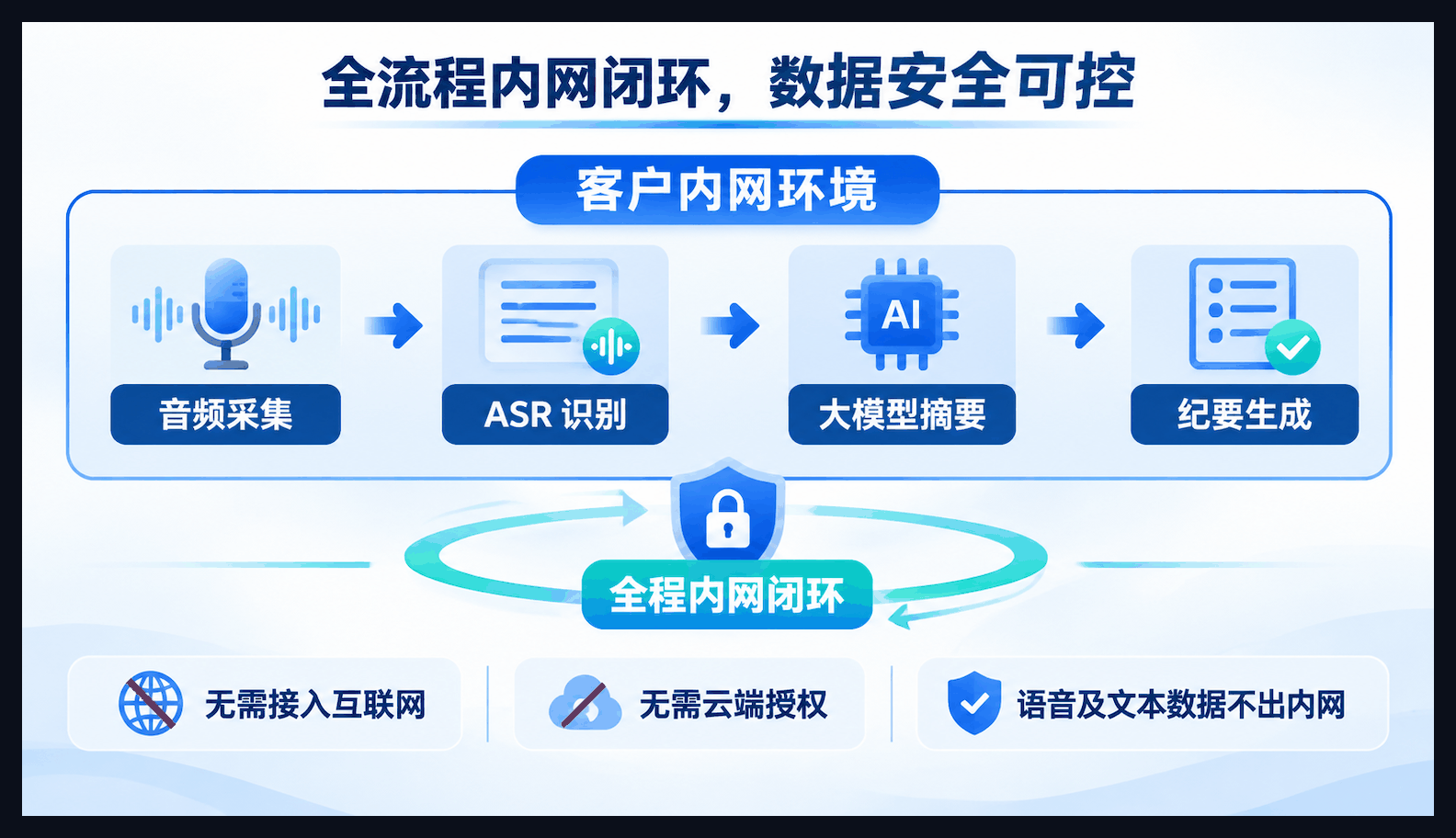
The first two are efficiency problems; the third is a management problem. This solution provides the matching product capability for all three, running entirely inside the court intranet or an air-gapped environment, without changing existing hearing procedures and without replacing the clerk's recording duty.
2. Program Overview
VoiVision AI’s VV series of on-premise meeting-minutes products comes in three form factors, matched to the size of the court:
| Model | Compute | Concurrency | Memory / VRAM | Storage | End-to-end latency | Where it goes | Court size it serves |
|---|---|---|---|---|---|---|---|
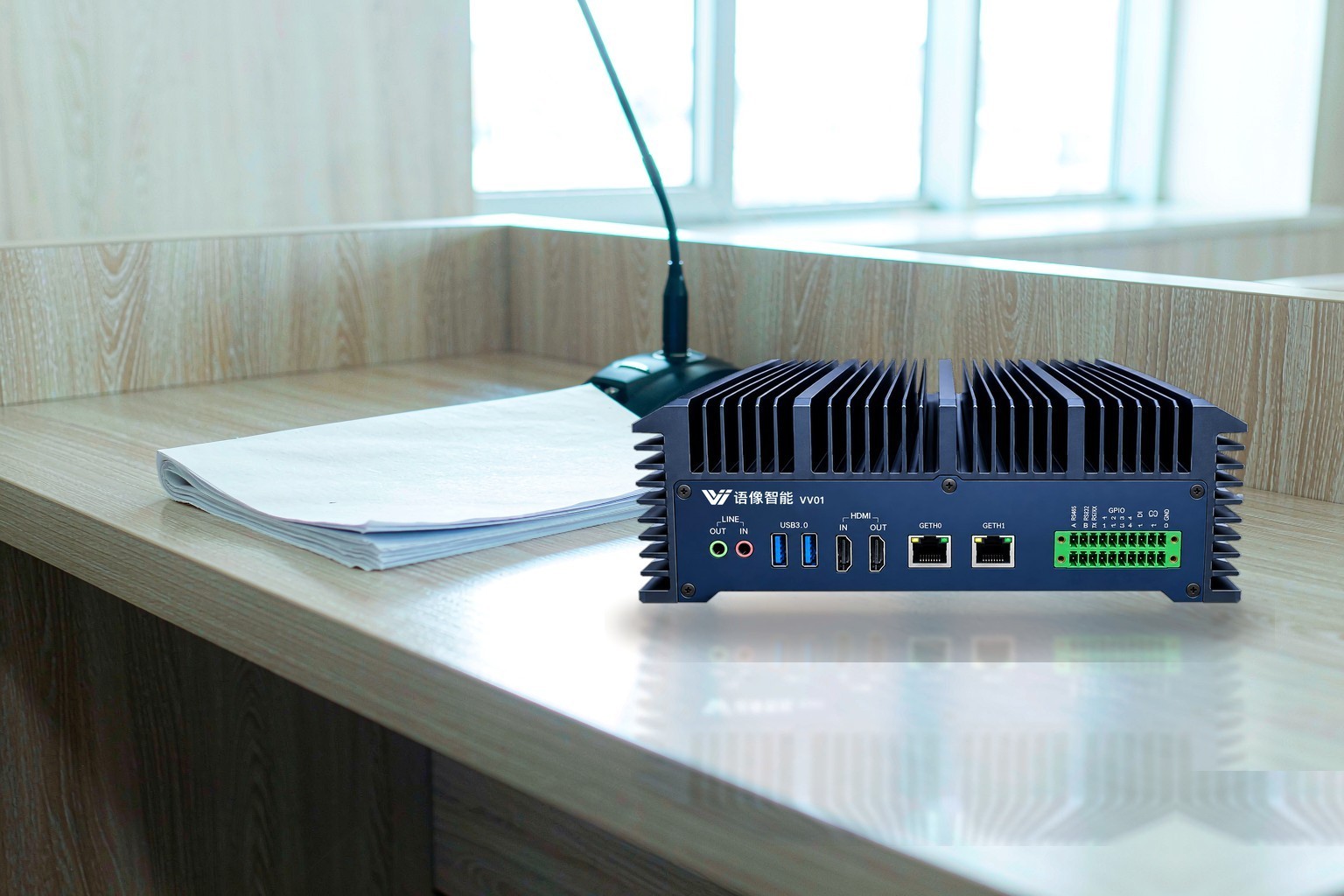
| VV01 On-Premise Meeting Minutes Host | 46 TOPS | 1 concurrent stream | 8GB / 10G | 128GB (expandable) | <1 second | On the desk inside the courtroom | A single courtroom, or small courtrooms in basic-level courts |
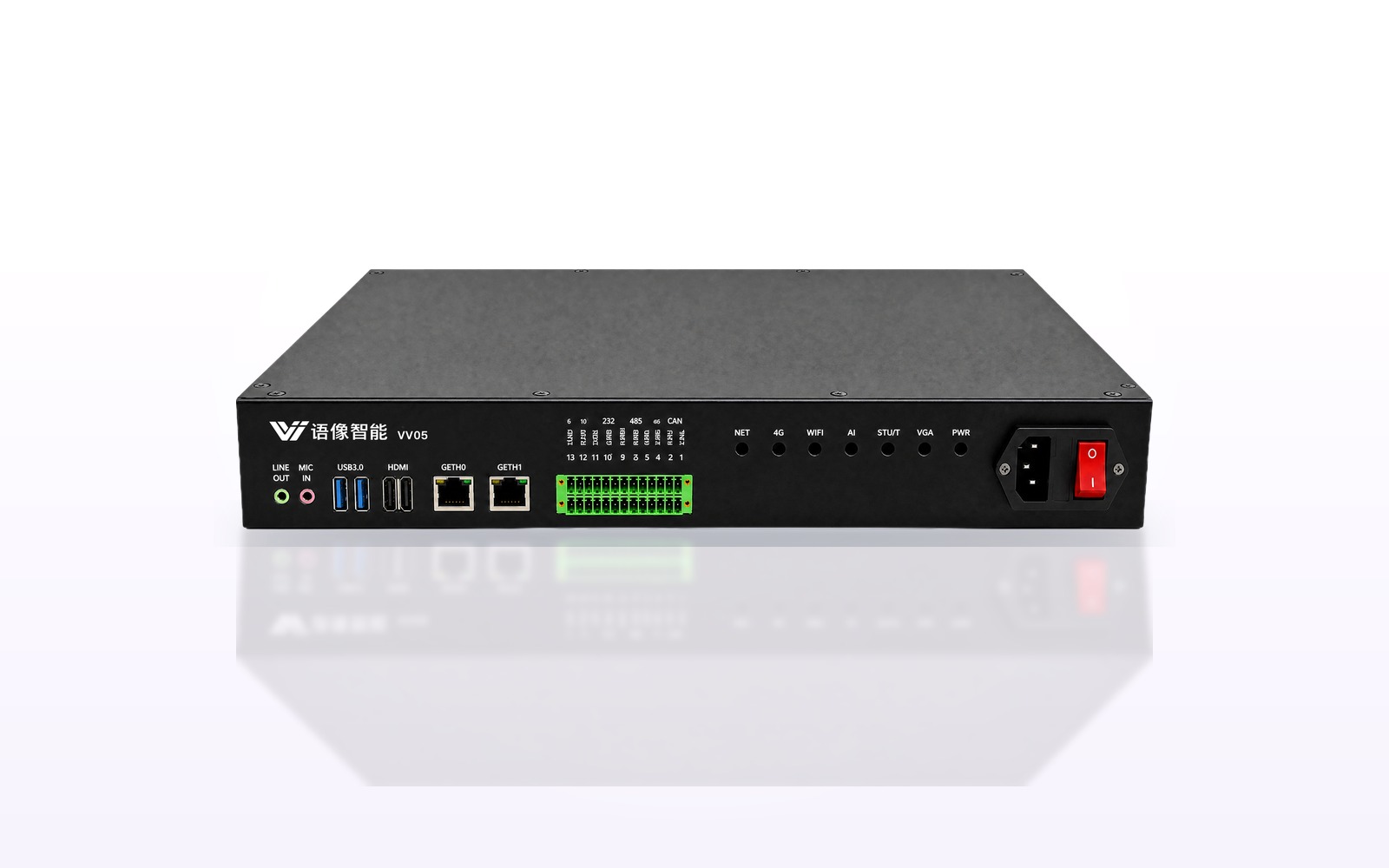
| VV05 On-Premise Meeting Minutes Server | 166 TOPS | 5 concurrent streams | 16GB / 24G | 128GB (expandable) | <1 second | Low-voltage room / server room | Intermediate People’s Courts with 4–10 courtrooms |
| VV10 On-Premise Meeting Minutes Server | 326 TOPS | 10 concurrent streams | 16GB / 48G | 128GB (expandable) | <1 second | Low-voltage room / server room | 10+ courtrooms, branch campuses, large-scale courts |
All three models deliver end-to-end latency under 1 second. VV10’s 326 TOPS is seven times VV01’s compute, and even with ten concurrent streams, per-stream latency still stays within one second.nnection remains under one second.
Storage specification note: all three models are listed at 128GB (expandable) in the official spec sheet. Larger capacity goes through an expansion plan — storage capacity and concurrency are two independent dimensions.
Concurrency note: the figures in the table are per-unit capacity. Total concurrency across a multi-node deployment depends on the aggregation node’s compute and must be calculated against on the actual deployment and cannot be obtained by simply summing the values for individual nodes.
3. System Architecture
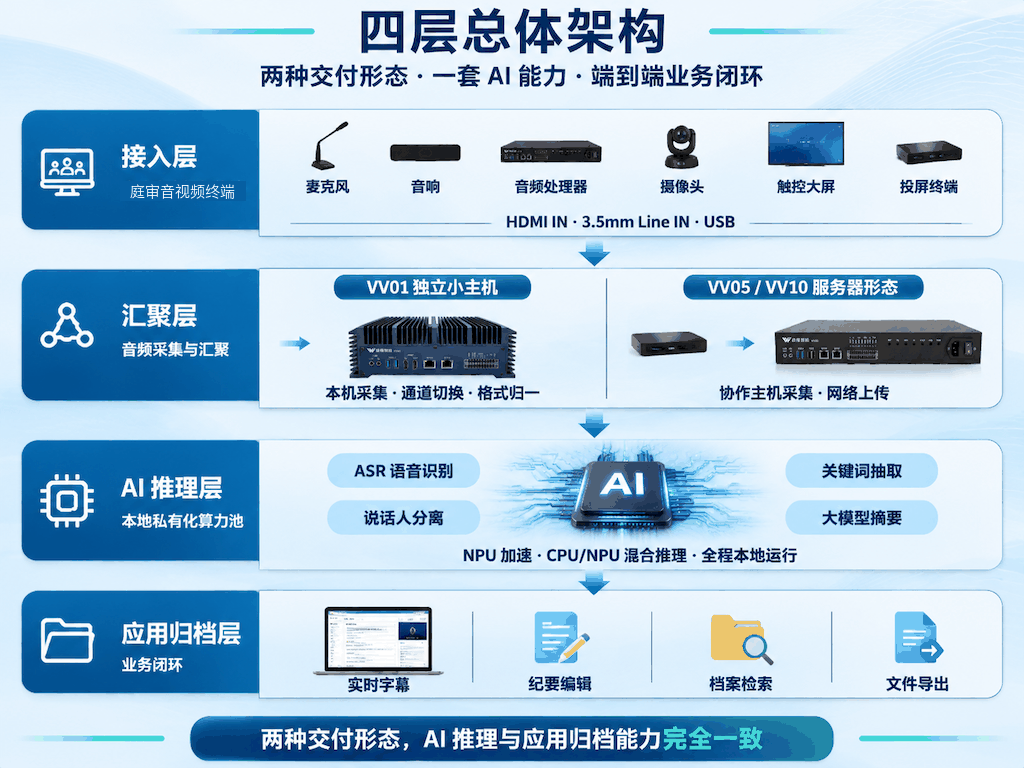
The overall architecture is divided into the data collection layer, the aggregation layer, and the inference and application layer. The differences between the two delivery models are concentrated at the collection and aggregation layers, while the capabilities of the AI inference layer and the application archiving layer are exactly the same.
| Layer | What it does | How the two forms differ |
|---|---|---|
| Collection layer | Pickup microphones, audio processor, courtroom display terminal, screen-cast signal | The connection method differs; what gets collected is the same |
| Aggregation layer | Channel switching, format normalisation, local capture or network upload | Standalone collects locally; the distributed form collects on a front-end host and uploads |
| Inference and application layer | ASR transcription, speaker diarization, OCR fusion, transcript structuring, search and archiving | Identical in both forms |
3.1 Collection Layer: Audio-Visual Collaborative Recognition
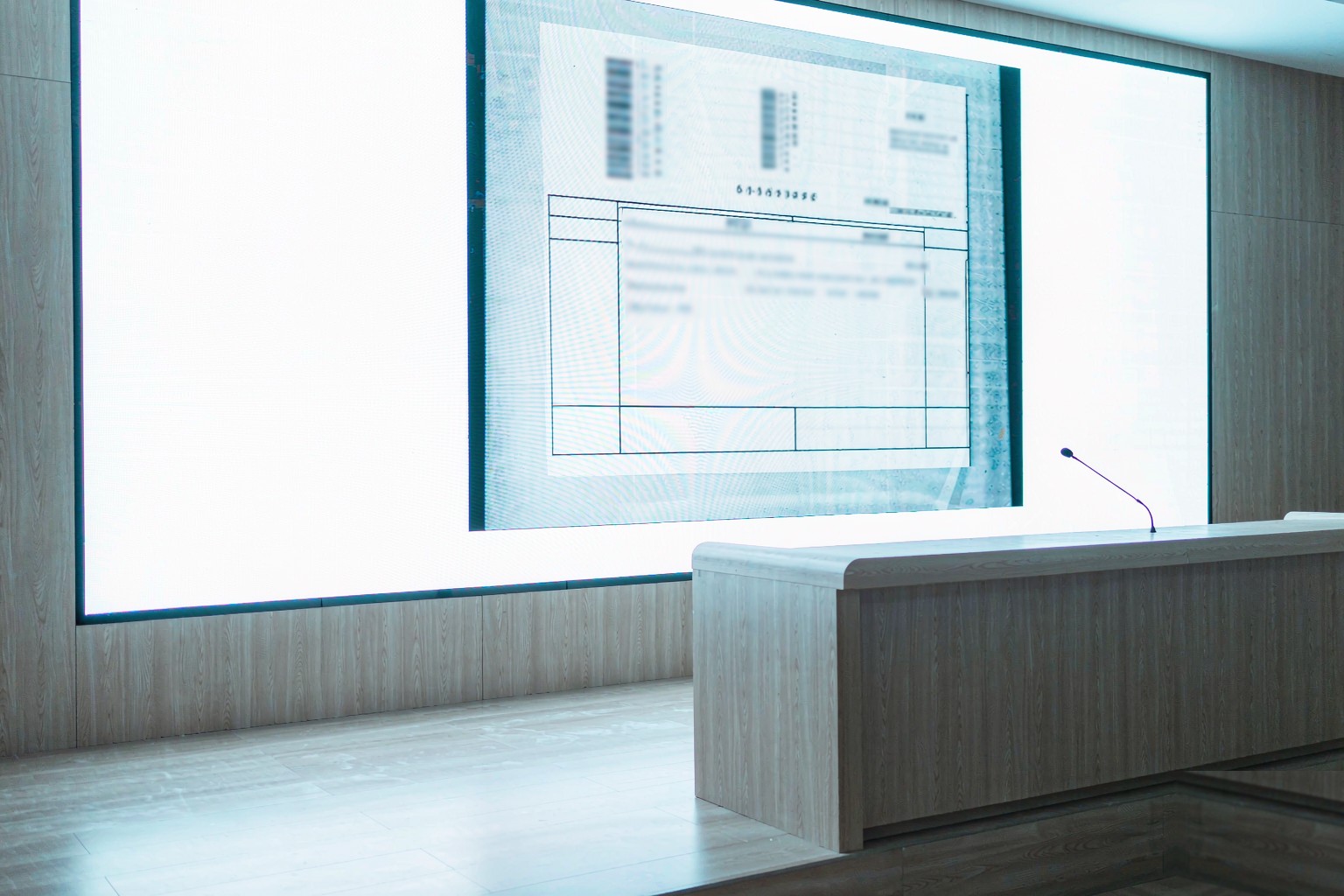
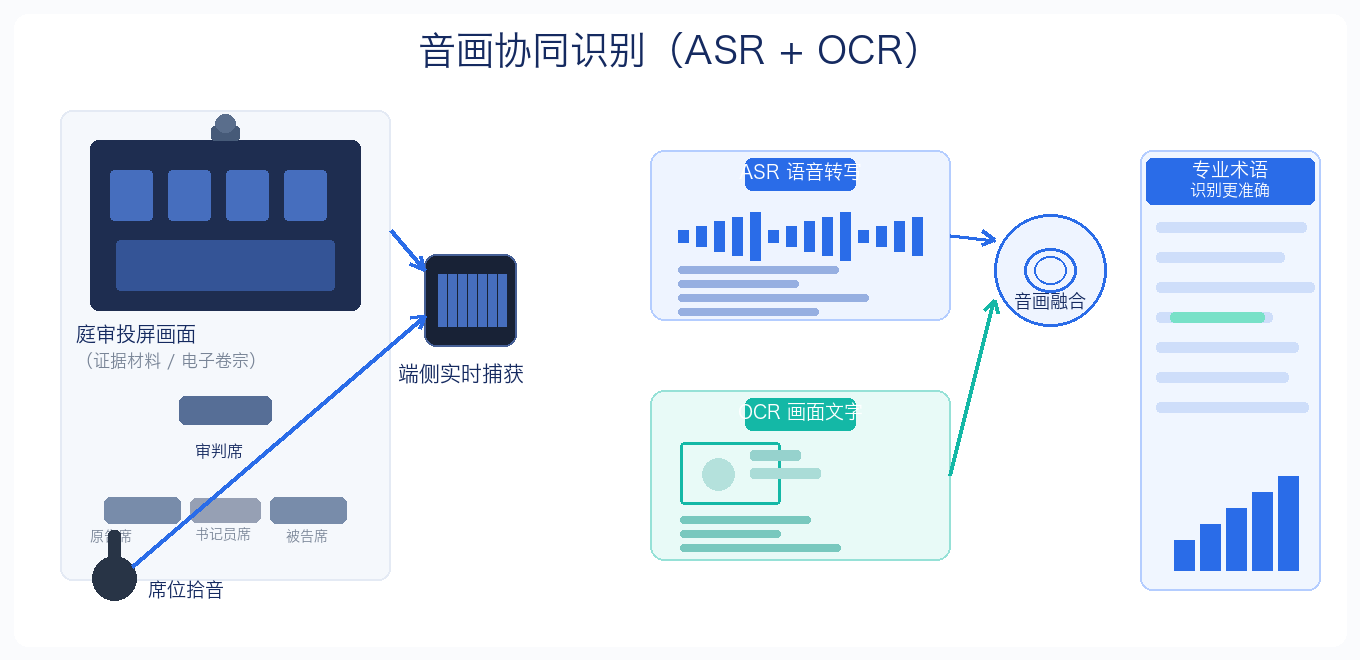
Audio reaches the system through three inputs, and the source can be switched manually at any time — with no need to re-cable the court’s existing audio-video paths: court:
| Input | What it captures | Notes |
|---|---|---|
| 3.5mm Line IN | Separate audio feeds for the bench, the plaintiff bench and the defendant bench | Fits the court’s existing mixer outputs |
| USB microphone | Supplementary or backup capture | Directional array mic, aimed at the seating position |
| HDMI IN | Courtroom view and shared-screen content | Up to 4K@60fps input; the basis for sound-and-picture collaborative recognition |
Sound-and-picture collaborative recognition (ASR + OCR) is a capability that on-device deployment makes possible: the system captures the shared screen in real time,, extracts the picture text by OCR, and makes fusion correction with the voice channel.
| Channel | What it contributes | Role |
|---|---|---|
| ASR speech channel | Courtroom pickup and line audio | The primary transcription path |
| OCR screen channel | Text read off the shared screen | Corrects technical terms and resolves homophones |
Why this matters especially in court: evidence screenshots presented during the hearing, PPT pages, party names and technical terms in electronic case files are often more accurate than anything anyone says out loud. The HDMI IN port has to carry the screen-casting signal anyway — the same connection captures the terminology source as a byproduct.
3.2 Aggregation Layer: Two Delivery Models
Form 1 — Single-machine on-site deployment (VV01)
Audio equipment is directly connected to the host deployed in the courtroom, which handles channel switching, format normalization, and local audio capture. No network dependency and no data center resources, complete functions in the state of disconnection, suitable for courts with scattered courts and no central computer room conditions.
Form 2 — Centralized deployment in the server room (VV05 / VV10)
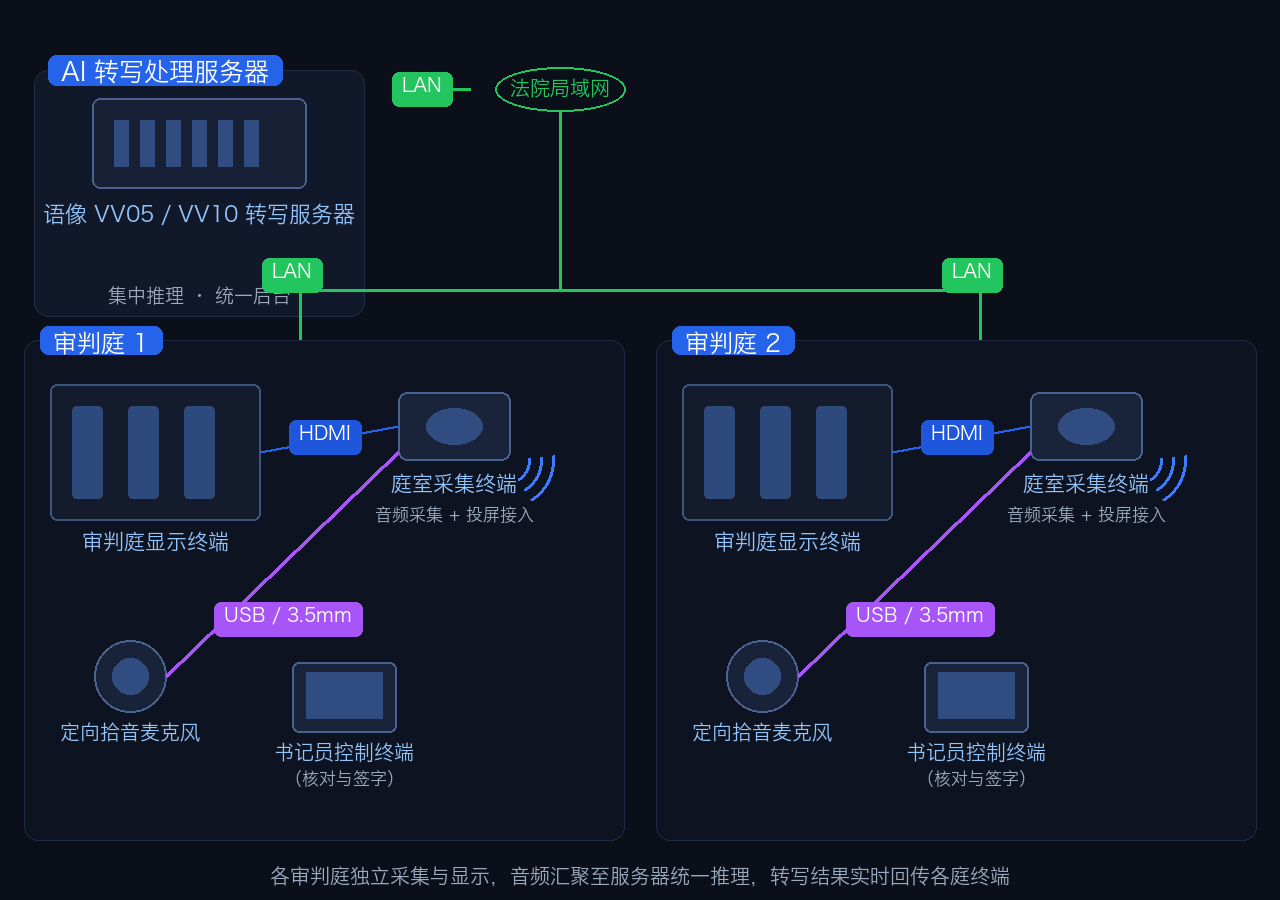
Audio equipment is connected to the courtroom's front-end collaboration host, capturing signals from HDMI IN, 3.5mm Line IN, USB, and other sources. These signals are uploaded via the court's internal network to the data center server for unified inference, while subtitles and transcripts are sent back to the terminals in each courtroom.
Server-side capabilities:
- Concurrent operation across multiple channels, with logical courtrooms that can be created, configured, torn down, and have their resources reclaimed.
- Data and computing resources are isolated across sessions.
- Front-end device registration, status monitoring, courtroom binding and unbinding, audio-stream validation, and anomaly reporting
- A centralised web console for viewing runtime status and transcription records in one place.
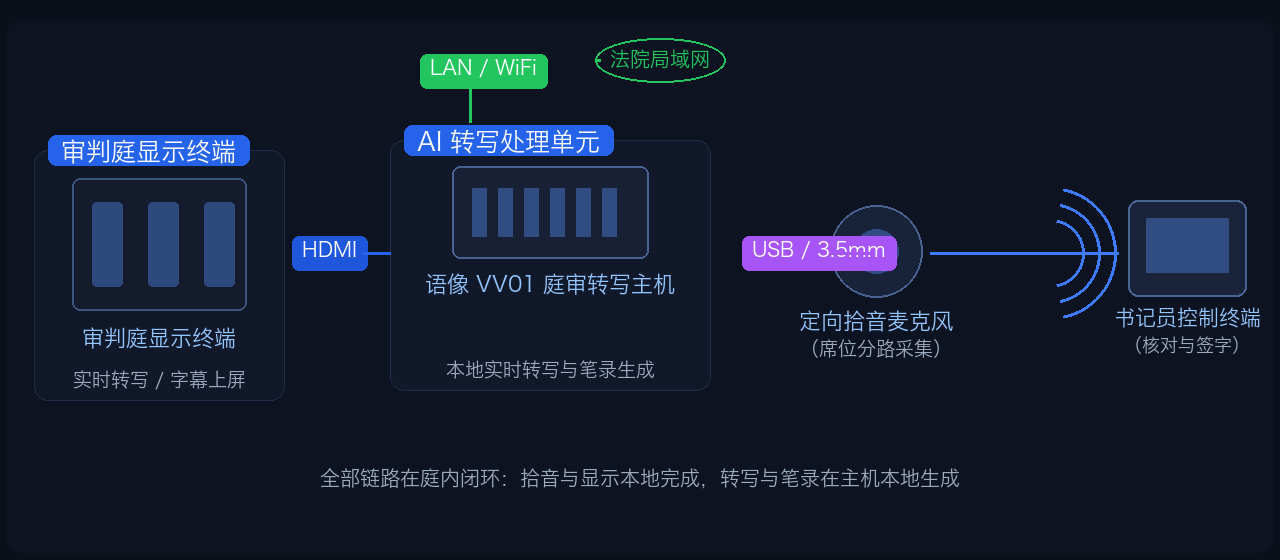
The diagram above illustrates a single-court local solution: equipment is deployed within the courtroom, and both audio pickup and display links operate in a local closed loop.
3.3 Reasoning and Application Layer
| Module | What it does |
|---|---|
| Real-time transcription | Automatic punctuation, intelligent segmentation and semantic correction; intermediate results visible as they arrive and can go straight to the display |
| Speaker diarization | Separates speakers such as the judge, plaintiff, defendant and legal representative; role labels are configurable |
| Sound-and-picture fusion | On-screen text feeds back into recognition, correcting technical terms and homophones |
| Transcript structuring | Automatically extracts the points in dispute, key evidence, rulings and action items, producing a minutes-style summary |
| Diff checking | Shows the raw transcript and the structured draft side by side, with line-by-line checking and an audit trail of every edit |
| Live monitoring | Watch the live sentence stream of the hearing on the web — speaker, timestamp, recognition status — with online editing |
| Search and archiving | Search across time, topic, speaker and keyword; hearing records stored locally, encrypted |
| Open integration | RESTful API / WebSocket for pushing transcripts and action items into the court’s case-management system |
3.4 List of Typical Courtroom Configurations
Take a single civil trial chamber — one judge, one clerk, a plaintiff bench, a defendant bench and gallery seating — as an example:
| Equipment | Quantity | Where it goes | What it does |
|---|---|---|---|
| VV01 host | 1 | Equipment cabinet in the courtroom | Collection, inference and storage |
| Directional microphone | 3 | Bench, plaintiff bench and defendant bench | Per-seat pickup — the physical basis of speaker separation |
| Audio processor | 1 | Low-voltage cabinet in the courtroom | Reuses the court’s existing mixing equipment |
| Courtroom display terminal | 1 | Bench / side wall | Live captions and transcript display |
| Clerk terminal | 1 | Clerk’s bench | Live monitoring, online editing, checking and signature |
The number of devices is adjusted according to the number of seats and pickup conditions. The host is connected to the existing devices through the 3.5mm Line IN, USB and HDMI IN channels, It is not required to transform the original audio and video lines of the court..
4. Core Competencies
4.1 real-time transcription and speaker diarization
- Natural paragraph breaks are configurable: set them by inter-sentence pauses, sentence count or character count, to suit different rhythms of speech in court
- intelligent semantic correction: Automatically correct homophone and typos
- Role labelling: after speaker diarization, the clerk or judge confirms each role’s name in the system, and those confirmations are stored as a courtroom-level configuration.
- Live monitoring: the web console shows the live sentence stream of the hearing — speaker, timestamp, recognition status — with online editing and annotation.
Performance targets: speech recognition accuracy ≥ 98% in standard Mandarin and standard American English; first-word latency ≤ 800ms; end-to-end latency under 1 second.ion delay <1 second. The platform supports recognition in over 20 languages and more than 10 Chinese dialects (including Wu, Cantonese, Sichuanese, and Minnan).
The actual performance in dialect and dialect-accent scenarios must be measured through on-site sampling of local accents, and it is not recommended to directly apply standard Mandarin norms.
4.2 judicial domain lexicon
Courtroom language differs significantly from everyday speech; the accuracy of identifying legal jargon, fixed terms, and parties' proper names directly determines the usability of the transcript.
| Entry type | Examples | Purpose |
|---|---|---|
| Legal terminology | Plaintiff, defendant, legal representative, presentation of evidence, cross-examination, court investigation, debate | Keeps procedural wording accurate |
| Party names | Party names, representative names, case numbers | Avoids confusion between participants |
| Case-specific terms | Project codes, technical terms, product model numbers | Improves recognition on particular cases |
| Local institutional terms | Names and titles used in this court | Fits local usage |
The lexicon supports batch import, domain categorization, hot-word hit statistics, and a manual review-and-approval mechanism for adding entries.
General capability: the raw transcript is passed through a large language model for error correction, smoothing, automatic punctuation and number normalisation, lifting overall accuracy by a further 5–10%. Together with the in-house speech front-end algorithms and a high-precision transcription engine, this forms the full chain ofcognition rate is increased by 5-10%. With the sself-developed speech front-end algorithm and a high-precision transcription engine, the end-to-end engineering capability of "front-end noise reduction → engine transcrition→ semantic correction" is formed.
4.3 Structuring of Transcripts and Difference Verification

The original transcriptions are a pile of continuous text, handed directly to the judge to read, and the burden is not reduced. The real burden reduction comes from structuring:
| Output section | Contents |
|---|---|
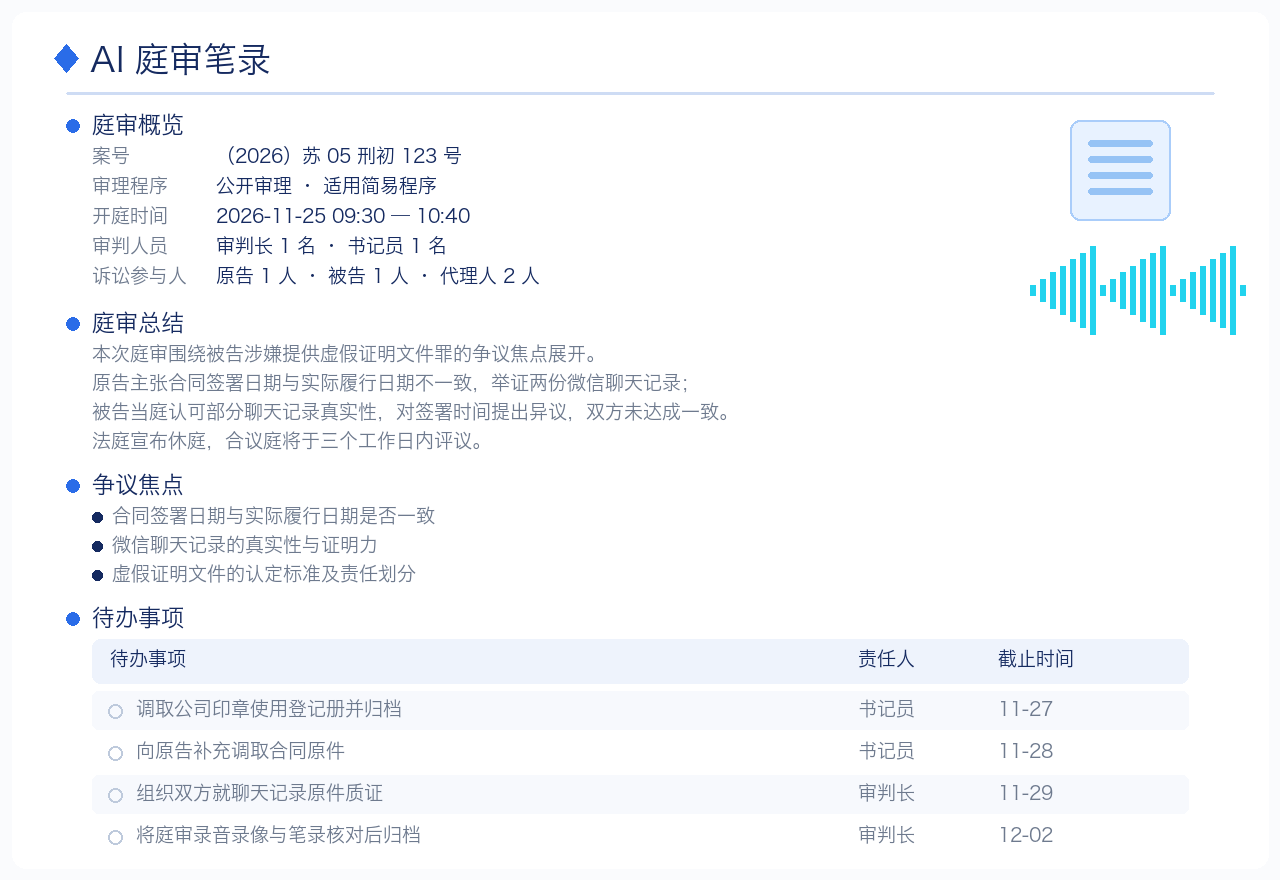
| Hearing particulars | Case number, procedure, hearing date and time, judicial panel, participants |
| Statements | Raw transcription split by speaker, with timestamps |
| Points in dispute | Automatically generated list of disputed issues |
| Evidence and rulings | Evidence produced in court and rulings made by the court |
| Action items | Matters to handle after the hearing, with the responsible party and the deadline |
The comparison mechanism is the design focus of this module. What the clerk sees on the review screen is the clause-by-clause difference between the raw transcript and the structured draft — only the changed parts need attention, and speaker diarization lets them jump straight to a given party's given statement. The audit-trail mechanism records who made each edit, when, and what the text said before.
Review shifts from re-listening to everything to incremental checking of only what changed — the main source of the efficiency gain in court record-keeping.
4.4 Full-Process Logging and Auditing
The system generates audit records at the following stages:
| Stage | What is logged |
|---|---|
| Audio capture | Start and end times, any interruption, and the written explanation |
| Transcription | Task ID, model version, generation time |
| Transcript edits | Who edited, when, and the text before and after |
| Check and signature | Who checked, when, and the signed confirmation record |
| Audio retrieval | Who requested it, when, and the excerpt played |
| Data export | The export action, its scope and its time |
Audit records are archived with the case, cannot be tampered with, and can be retrieved by case, by personnel, or by time.
5. Integration with the court case management system
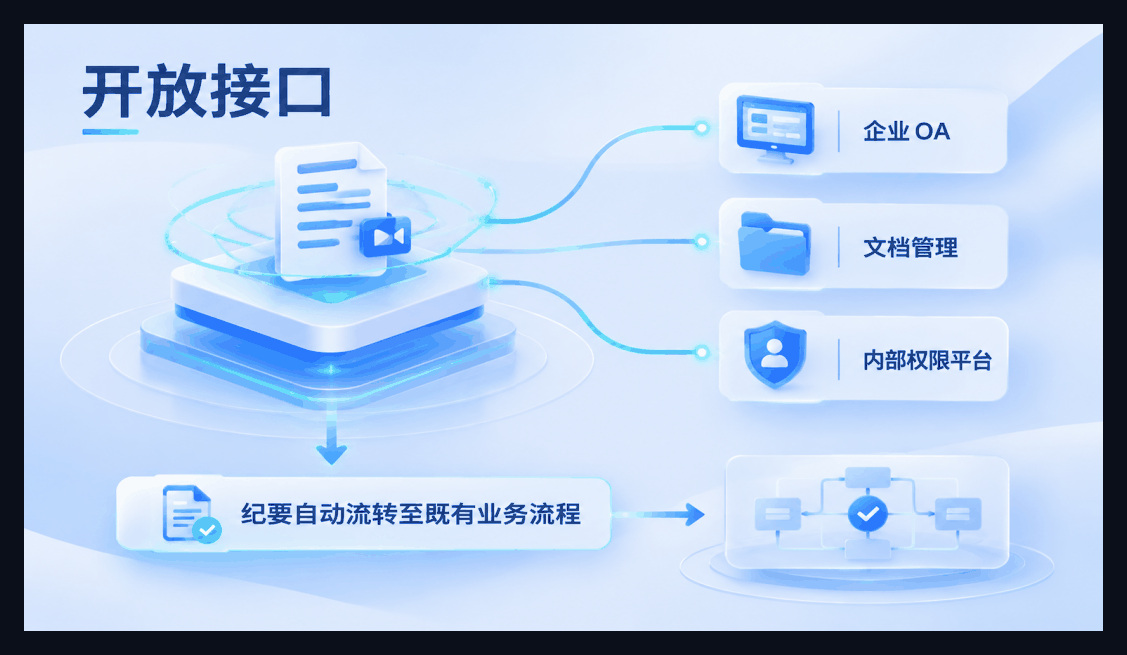
The system connects to the court's existing systems through standard interfaces, with no proprietary protocol binding and no changes required to the existing case-management systems:
- Transcript push: the structured transcript and its key fields are pushed to the transcript module of the case-management system over standard interfaces.
- To-do circulation: To-do items are written into the court's existing task flow process.
- Audio backtracking: each transcript entry carries its timestamp, so case handlers can pull up the corresponding audio segment directly.
- Identity and permissions: integrates with the court’s unified authentication, with view, edit and export permissions assigned by courtroom and role.
Classified and non-public hearing chambers are configured separately at the integration layer; their audio and text never enter the standard push channels.
6. Conditions of Application and Exclusions
The biggest difference between a judicial setting and an ordinary corporate one is that the system’s output must never be treated as a legal document. The design adheres strictly to that boundary.ctly to this boundary in its design.
6.1 Principle of Judicial Assistance
The Supreme People’s Court’s 2022 Opinions on Regulating and Strengthening the Judicial Application of Artificial Intelligence establish the principle of judicial assistance: AI-assisted results may serve only as be used as a reference for trial work or trial supervision and management, Ensure that judicial decisions are always made by the judges, that the authority to make decisions is always exercised by the trial organization, and that judicial responsibility is ultimately borne by the judges..
Accordingly, the role of the system in this scenario is clearly defined: a trial recording and organization tool that takes no part in fact-finding, legal application, or adjudication.
6.2 Three Direct Bases
| Article | What it requires | Corresponding system capability |
|---|---|---|
| Article 2 | People’s courts shall equip courtrooms with fixed or mobile audio and video recording equipment; where conditions permit, courts may install intelligent speech recognition systems that transcribe in sync | Deployed as a standalone device in the courtroom, which the provision allows |
| Article 6 | Transcripts generated by synchronous transcription through intelligent speech recognition systems, once verified and signed by the judicial panel, the clerk and the participants, serve as the court record | Supports jumping back to the audio by sentence, audited edits, online checking and signature confirmation |
| Article 8 | Audio and video recordings of hearings in civil cases tried under the summary procedure may, with the consent of the parties, replace the written transcript | Output meets the formal requirements of a transcript and goes straight into the checking and signature workflow |
Article 6 is the benchmark for product design: what the system outputs is a first draft of the transcript, not the transcript itself. The system must fully support the workflow of "generation → review → audited edits → signature confirmation → archiving."
6.3 Conditions of Application
Pursuant to Article 8 of the Several Provisions and the implementing rules adopted by local courts for the clerkless courtroom trial model, the use of audio and video recordings in lieu of court transcripts must simultaneously satisfy:
- The case type falls within the scope prescribed by this court (generally, summary civil cases).
- the parties’ prior written consent, and a confirmation form signed by the judge after the pre-hearing explanation, per the “Clerkless Hearing Record Notification and Confirmation”
- The hearing was recorded throughout in audio and video, with any interruption documented in writing and placed on the case file.
6.4 Exclusions
| Case type | How it is handled |
|---|---|
| Hearings not open to the public | The substitute-transcript mode is disabled; the system is used only as a synchronous transcription aid |
| Classified cases | The substitute-transcript mode is disabled and the case is handled separately under confidentiality rules |
| Highly sensitive cases | The substitute-transcript mode is disabled |
| Factually complex, heavily disputed cases | The court itself decides whether to include the case in the pilot |
Corresponding design on the system side: the situation above exists in the system as a scene-level switch — you can configure permissions and disablement policies per courtroom, and the console keeps a record of every configuration and change.
7. Implementation Path
| Stage | Work | Deliverable |
|---|---|---|
| ① Site survey | Number and type of courtrooms, seating layout, existing pickup and display equipment, noise environment, intranet access point, power | Survey report, point layout |
| ② Solution and procedure confirmation | Applicable mode by case type (synchronous transcription / clerkless substitution), deployment form, and the notification and confirmation procedure | Deployment plan, procedure mapping |
| ③ Deployment and commissioning | Host mounted in the rack or cabinet, audio path connected, subtitle display tuned, concurrency load tested | Deployment record, test report |
| ④ Lexicon and template configuration | Legal terminology and court-specific terms imported; transcript templates and structured rules configured | Judicial-domain lexicon, template set |
| ⑤ System integration | Case-management API, identity authentication and permission configuration | API documentation, integration test record |
| ⑥ Training and trial run | Clerks trained on the checking workflow, judges’ file-review habits accommodated, the party checking and signature workflow rehearsed | Training materials, user manual |
| ⑦ Acceptance | Functional acceptance, accuracy sampling by dialect and speaking speed, performance acceptance, security and audit-trail acceptance | Acceptance report |
Phase ② requires court-led confirmation: Which cases are applicable, which courts and rooms are piloted first, and how to implement the notification and confirmation process are within the scope of the court's authority. The program party provides capacity support and process suggestions and does not decide on its behalf.
7.1 Accuracy Sampling Method
During the acceptance phase, it is recommended to conduct sample testing according to the following criteria to establish reusable baseline data:
| Sampling dimension | How to sample | What to record |
|---|---|---|
| Speaking pace | Segments of ordinary statements, rapid cross-examination and heated argument | Recognition accuracy per segment |
| Dialect | Sample dialect-speaking parties according to this court’s case distribution | Recognition accuracy per dialect |
| Noise | Typical conditions such as gallery occupancy and whether the air conditioning is running | Recognition accuracy per condition |
| Proper nouns | This court’s high-frequency legal terms and party-name list | Proper-noun hit rate |
| Human baseline | The same batch of recordings compared against manual notes | Manual record completeness rate |
Sampling results are archived by dialect, speaking rate and noise level, giving the team a baseline for later lexicon optimisation and model tuning.
8. Technical Foundation
VoiVision AI's technological foundation stems from the NLP Laboratory of the Department of Artificial Intelligence at Northeastern University (established in 1973, with 52 years of accumulated expertise): it has published a total of 200 papers (including 20 CCF‑A category papers) and obtained 110 invention patents (54 of which have been granted). NiuTrans has been used globally 100,000 times and delivers four times the speed of mainstream general‑purpose large models. In 2016, received the First Prize of the Qian Weichang Chinese Information Processing Science and Technology Award.
Native speech-engine adaptation — NVIDIA (T4 / L4 / A10 / A100), Ascend (310P / 910B), Cambricon (MLU370 / MLU590) and Hygon DCU, with pure-CPU inference also supported. Deployment options cover desktop hosts, departmental servers, enterprise-class servers, the government affairs internal network, and fully physically isolated offline environments (Docker, /, K8s containerized one-click deployment; physical bare-metal servers; government affairs cloud, / private cloud, /, Xinchuang environments).
The same base also supports private meeting-transcription deployments in other industries:
| Industry | Core requirement | Product |
|---|---|---|
| Government meetings | Runs on the government intranet, data never leaves the premises, managed under confidentiality rules | VV01 / VV05 / VV10 |
| Defence research | Physically isolated environment, zero external connectivity | VV10 + pure software engine |
| Financial services | Compliance retention and audit traceability | VV05 / VV10 |
| Healthcare | Accurate consultation records; patient data stays inside the hospital | VV01 / VV05 |
| Enterprise & education | 20+ languages, 10+ Chinese dialects, live in session | VV01 + VT02 / VT10 / VTD15 |
9. Key Selection Points
① Output form The system delivers a verifiable draft transcript, supporting the coexistence of the original text and the edited version, sentence-by-sentence playback with audio repositioning, online editing with change tracking, and signature confirmation. The verification and confirmation stage is carried out by the adjudicating personnel, the court clerk, and the parties to the proceedings.
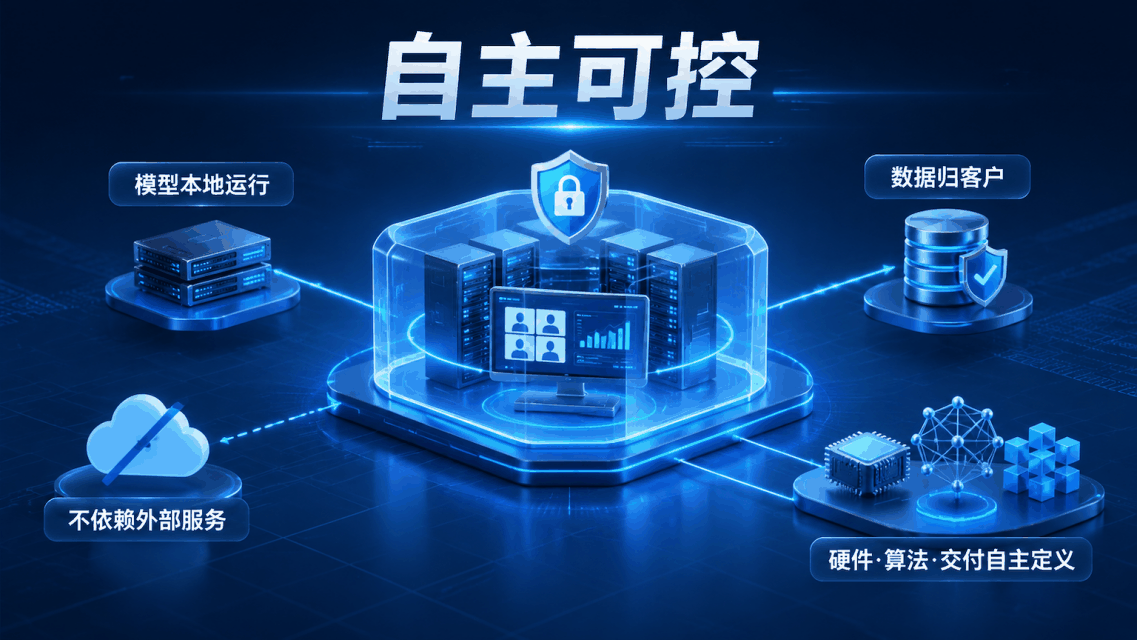
② Data boundary Operates entirely on-premises, without relying on any public network or third-party cloud services, and retains full functionality even when disconnected from the internet. This is a prerequisite for deploying the court scenario, not an optional bonus.
③ Judicial-domain lexicon Legal terminology, proper nouns, and transcript templates are fundamental components for ensuring transcript quality and must be included in the implementation scope.
④ Scene-level disable classified and non-public trial chambers must have permission isolation and scene-level disabling capabilities, with full audit trails for configuration and changes.
⑤ The program is irreplaceable The three statutory procedures—written notification, pre-trial clarification, and post-trial signature verification—are carried out by the court; the system provides supporting tools but does not replace the statutory processes.
What VoiVision AI delivers here is not a box of hardware but a complete path that turns court record-keeping from a manual burden into a system capability — freeing the clerk from verbatim transcription and leaving them to review and organise, while the system takes on the completeness and traceability of hearing materials.k to check and organize from the verbatim record, and hand over the integrity and traceability of the trial materials to the system.
At the institutional level, the authority to authenticate court transcripts has always rested with the adjudicating judges and the parties to the proceedings, while judicial accountability rests with the decision‑maker—this is precisely the precondition that allows the proposed framework to be integrated into court operations.
Product details: VV01 On-Premise Meeting Minutes Host | VV05 On-Premise Meeting Minutes Server | VV10 On-Premise Meeting Minutes Server Related solutions: government affairs Conference | finance Organization | defense Research | healthcare Organization Talk to us: Contact Us
FAQ
Q: What problem does Smart Court's AI transcription real-time recording solution solve?
A: Three issues: First, the burden of verbatim transcription during intensive evidentiary proceedings—by leveraging end-to-end local real-time transcription and speaker diarization, we ensure that the statements of judges, plaintiffs, defendants, and counsel are recorded separately and without omission. Second, the time required to organize and verify post‑hearing transcripts—by comparing raw audio with prepared summaries, we shift verification from full‑length re‑listening to incremental checks. Third, the archiving and traceability of courtroom materials—through full‑process logging and multidimensional search capabilities, we enable verifiable access.
Q: Can the results of AI transcription be used directly as court transcripts?
A: Cannot be used directly. Pursuant to Article 6 of the Supreme People's Court's Provisions on Audio and Video Recording of court Hearings, written transcripts of court proceedings generated through synchronous conversion by the Intelligent speech recognition system shall be managed and used as official court records only after being verified and signed by the adjudicating personnel, the court clerk, and the parties to the litigation. The system delivers a draft transcript that can be verified; the verification and confirmation process is carried out by the adjudicating personnel, the court clerk, and the parties to the proceedings.
Q: Under what circumstances can audio and video recordings substitute for court transcripts?
A: Pursuant to Article 8 of the same provision, for civil cases tried under the summary procedure, audio and video recordings of the court hearing, with the consent of the parties, may serve in lieu of the court transcript. This is the primary legal basis for the current court trial model without court clerks, and the specific scope of cases to which it applies is determined by the courts in accordance with their own regulations.
Q: After the court deploys this system, how are the courtroom audio recordings and their transcribed texts stored?
A: speech recognition, speaker diarization, and the minutes-generation functionality all operate within the court's own servers or data center; audio and text data remain entirely within the internal network and do not traverse any public internet or third-party cloud services. Even in offline scenarios, transcription, translation, and minutes generation continue to function normally. The system supports deployment on the court's internal network and in physically isolated environments; specific qualification requirements shall be subject to the actual assessment results of the project.
Q: How does this solution interface with the court case management system?
A: By interfacing with the standard RESTful, API, and WebSocket protocols, structured transcript can push to-do items into the court's existing case management system. Transcript entries carry audio timestamp information, allowing case-handling personnel to directly retrieve the corresponding audio segments. Integrates with the court's unified identity authentication system and assigns view, edit, and export permissions based on division and role.