
How does VT02 On-Premise AI Meeting Translation achieve latency of less than 1 second?
VT02 is the desktop On-Premise AI Meeting Translation host of VoiVision AI. It has built-in 46 TOPS on-device computing power and translation model, and supports three modes of face-to-face two-way translation, one source and two targets, and three-language distribution. This article disassembles what scenarios the three modes apply to, how to achieve end-to-end <1 second for large screen and double flat panel synchronization, and how to land in foreign-related negotiations and cross-border meetings.
The Short Answer: What Is VT02?
VT02 is a desktop-class on-premise AI meeting translation host: 46 TOPS of on-device compute with a built-in translation model. It supports one channel of two-way real-time simultaneous interpretation, bilingual subtitles and TTS audio output. Its three translation modes cover everything from bilateral talks to three-language meetings, with first-word latency ≤ 800ms and end-to-end latency under 1 second — all running entirely on local hardware, with no server room involved.
It solves what looks like a contradiction: cross-border meetings need real-time interpretation, but the audio must never leave the intranet.
Technical Approach: The Three Translation Modes VT02 Supports
Mode 1 — Face-to-Face Two-Way Interpretation: How It Works
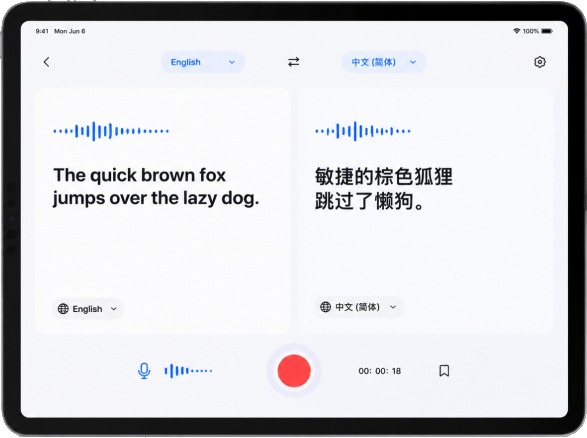
Configure 2 concurrent speech-translation channels for face-to-face, two-way multilingual interpretation. Automatically trigger translation after speech clause recognition, translation Asynchronous sentence-by-sentence backfill.
"Sentence-by-sentence asynchronous backfill" is the key to the experience: You don't need to wait for the whole paragraph to finish before you come out of translation, say one sentence, say one sentence.
The matching three-terminal synchronization (a design specific to face-to-face talks):
| Ability | Description |
|---|---|
| Large screen + two tablets, three-terminal state synchronization | Sides A and B each bind their own target language |
| Operable from any terminal | Start / Pause / Resume / End, with state synchronised globally |
| One-click swap of the A/B roles | After the swap, side A displays English and side B displays Chinese, with no session restart |
| Language lock | The language pair cannot be changed once the session is under way |
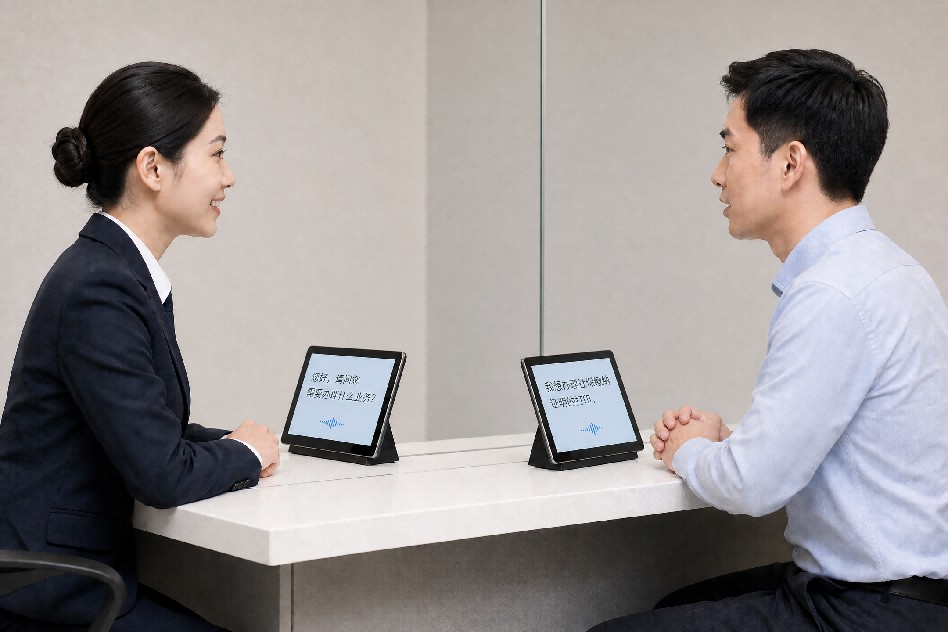
This mechanism addresses the real pain points of face-to-face meetings. Two people sit opposite each other. Both sides want subtitles in their mother tongue. The host also needs to see the whole process. In the past, either one device took turns to watch, or the two systems would be out of sync if they ran each other.
Mode 2 — One Source, Two Targets: When Does It Fit?
A single source channel is recognized, and once recognition completes, translations in both target languages are output simultaneously. Configure one source language and two target languages.
Best for: the foreign side speaks English, the Chinese side needs Chinese subtitles, and another group — a headquarters team or a second interpreter, say — needs Japanese. One meeting, two sets of subtitles, no second system to run.
Mode 3 — Trilingual Distribution: How the Routing Works
Configure any three languages as A, B and C. ASR detects the source language of each utterance and routes the translation automatically:
source = A  →  output = B, C
source = B  →  output = A, C
source = C  →  output = A, B
Any combination of A, B and C is supported.
Best for: three-party or multi-party meetings where the speaker is not fixed — someone speaks Chinese, someone else English, someone else Japanese. The system detects the source language and dispatches the other two translations automatically, with no manual channel switching.ends out the other two translation according to the detected source language, No need to manually switch channels.
How to Choose Between the Three Modes
| Mode | Channel configuration | Source language | Output | Typical scenario |
|---|---|---|---|---|
| Face-to-face two-way interpretation | 2 concurrent channels | Bidirectional | The other party’s language | International talks and cross-border negotiations |
| One source, two targets | 1 source + 2 targets | Fixed, one language | Two languages at once | Headquarters and local teams following bilingually |
| Trilingual distribution | A / B / C | Detected automatically | The other two languages | Three-party meetings where participants vary |
In all three modes the language pair is locked for the duration of the session. That keeps the interpretation chain consistent, so earlier and later translations never disagree.ailure before and after.
Hardware: What Is Inside the 46-TOPS Desktop Host?
| Item | Specification |
|---|---|
| Main processor | Octa-core 64-bit big.LITTLE: 4 × Cortex-A76 + 4 × Cortex-A55 @ 2.4GHz |
| AI compute | 46 TOPS (on-device NPU) |
| Memory / VRAM / storage | 8GB / 10GB / 128GB |
| Wired / wireless | 2 × RJ45 Gigabit Ethernet / Wi-Fi 6 |
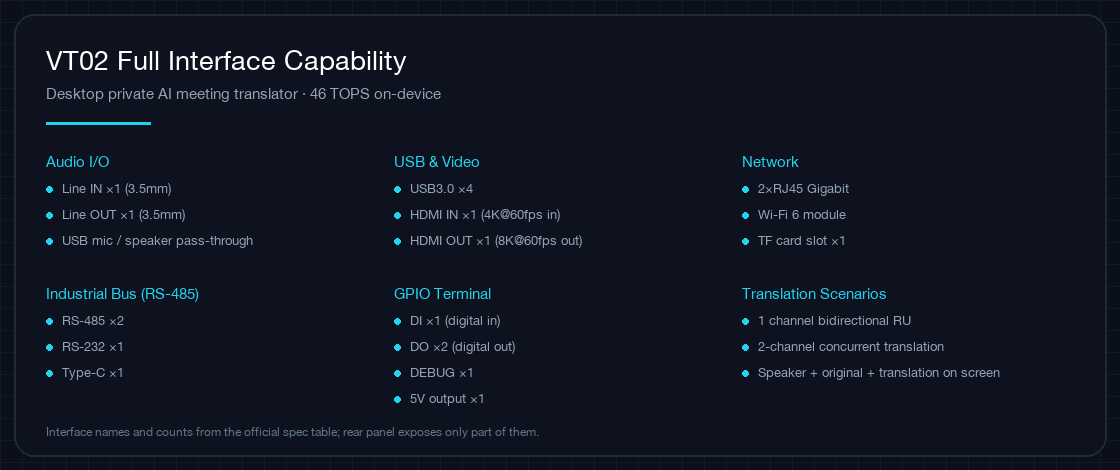
| Video I/O | HDMI IN × 1 (4K@60fps input), HDMI OUT × 1 (8K@60fps output) |
| Audio I/O | Line IN × 1, Line OUT × 1 (3.5mm) |
| Other I/O | USB 3.0 × 4, RS-485 × 2, RS-232 × 1, TF card slot × 1, Type-C × 1 |
| Power / environment | DC 12V/6A; 0–60℃, 10%–90% non-condensing |
| Operating system | Linux |
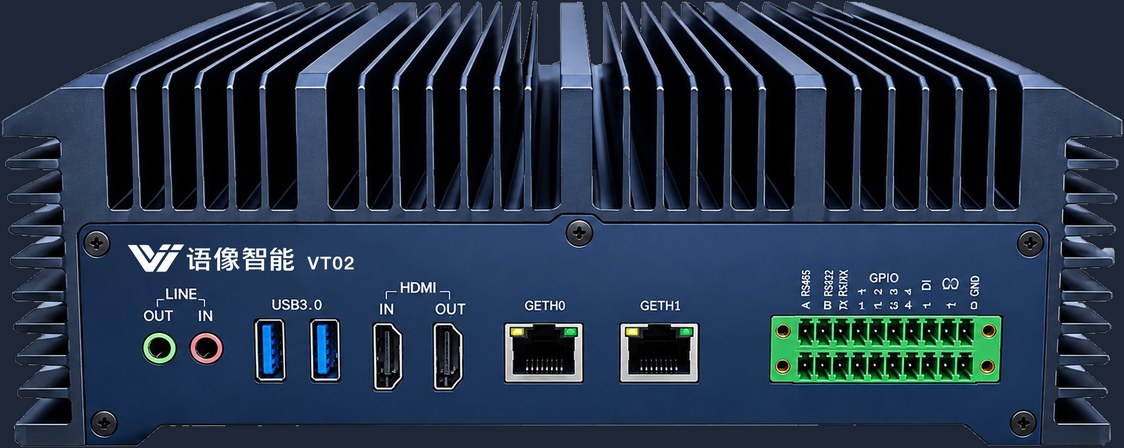
A built-in ASR and translation model — this is the fundamental difference between VT02 and "turning on translation in general-purpose meeting software": the translation model is local and does not need to be networked to call the cloud interface, No volume billing, no data outbound, no risk of service interruption.
Industry Solutions: Four Deployment Scenarios
Scenario 1 — International and Cross-Border Negotiations
Typical setup: one VT02, two tablets (one for each side), a large display, and a desktop microphone.
Flow: the two parties sit opposite each other → each tablet binds its own language → the large display shows both sides’ subtitles in sync → either end can start, pause, resume, or end → and when the sides need to swap, one click exchanges the A/B roles.an be operated to start/pause/end → exchange A/B roles with one key when changing sides.
Compliance: audio and text never leave the intranet at any point — international talks often involve undisclosed commercial information, which makes this a hard requirement.
Scenario 2 — Cross-Border Video Conferences
Typical setup: a VT02 with USB microphone/speaker pass-through, or HDMI IN fed from the video-conferencing endpoint.
Why pass-through matters: upstream, the local microphone becomes the PC’s conference input while the host captures the same audio for transcription; downstream, the remote audio is played out through the local speakers and captured at the same time — so what the far end says is both heard and recorded into the minutes.ption. Downstream sends the remote audio of the conference to the local speaker for external playback and synchronous collection-- What the remote said was both heard and recorded in the minutes..
HDMI Path: HDMI IN supports 4K @ 60fps input and can directly receive signals from video conference terminals. When HDMI input signal is detected, the subtitle superposition mode is automatically switched to superimpose real-time transcription/bilingual subtitles on the external screen.
Scenario 3 — Multinational Retail and Chain HQs
Typical setup: beyond the VV01 scenario, VT02 handles communication with external parties.
Process: Foreign shop assistants communicate with customers → two-way translation → both parties read subtitles in their mother tongue → the shop keeps translation records.
The key point: one device and one workflow, with no separate system per foreign language. Languages are configured before the session, with support for more than 20 languages to identify + more than 15 target language translation.
Scenario 4 — Classified and Air-Gapped Environments
Typical Configuration: VT02 is deployed in a physically isolated intranet, Not connected to any internet.
- Runs entirely on local hardware, with no cloud entitlement required
- Built-in ASR and translation model, with a closed on-premise data loop
- Capable of supporting deployments that meet MLPS Level 3 and classified-security requirements (whether it actually qualifies as MLPS Level 3 depends on the assessment result) reached or not is subject to the actual evaluation conclusion)
- Adapted to mainstream Xinchuang CPUs and domestic AI accelerators
More Than Translation: Switching Back to Meeting Minutes Mode with One Click
VT02 supports one-click switching between translation host mode and Meeting Minutes Host mode — the same device acts as a translation host when interpretation is needed, and Meeting Minutes Host when not needed.
Available in both modes:
- AI Meeting Secretary: one channel of local speech transcription, with subtitles and minutes generated automatically
- Sound-and-picture collaborative recognition (ASR + OCR): captures the screen-cast image on-device, and OCR results materially improve the accuracy of technical termsonal terminology transcription.
- Speaker separation and voiceprint matching: extracts voiceprints to tell speakers apart, with custom role labels and automatic matching against a voiceprint library
- Terminology base and hotwords: organised by domain, with AI-suggested hotword extraction, homophone-conflict clustering, and automatic down-weighting of hotwords that never hit
- Subtitles and large-screen display: speaker, source text and translation share one screen; overlay is automatic when the source is HDMI
- Meeting summaries and action items: 30+ preset industry summary templates, plus custom templates
- Source-text polishing: automatically corrects colloquial phrasing and wording slips while preserving the speaker’s tone
- Take it away by QR code: once transcription ends, the large display shows a QR code that attendees can scan to retrieve the minutesollect it.
File transcription and batch processing: supports common audio and video formats — wav, mp3, m4a, aac, flac, mp4, mov and more — with batch import and fast batch transcription and fast batch processing. Offline file transcription runs at up to 10:1 (ten minutes of audio or videoent to complete text transcription in about 1 minute); Support Chinese and English multilingual translation, passage optimisation and summary generation; you can upload recording files in batches through Web background for offline transcription, and support the configuration of languages, translation target languages and summary templates by file.
The web console opens in any mainstream browser such as Chrome or Edge, covering device configuration, runtime status, minutes editing, and meeting management, and lets you watch the live sentence stream of an in-progress meeting — speaker, timestamp, recognition status and translation.iting and meeting management. It supports real-time viewing of sentence flow information (speaker, time, recognition status, translation) of ongoing meetings, online editing, undoing changes, marking key points/problems/to-do and adding notes.
Three Things to Confirm Before Choosing a Model
① Which mode should you use? Mode 1 is selected for bilateral talks; Mode 2 is required for two target languages; Mode 3 is not fixed for three parties or participants. It is decided before the conversation starts and cannot be changed in progress.
② Is the site physically isolated? Physically isolated environments can be deployed offline, not networked.
③ How heavy is the terminology load? International talks are dense with product names, abbreviations and industry terms — configure the domain terminology base first, and let the recognition end hotword list and the translation end terminology base share the same vocabulary, otherwise the recognition end and the translation end will have inconsistent understanding of the same word, and the terms in translation will be deformed.
Product parameters are as listed on the official site at /en/products/vt02 and in the fact sheet.
FAQ
Q: What is VT02, and where does it fit?
A: VT02 is VoiVision AI’s desktop-class on-premise AI Meeting Translation host — a desktop appliance. It supports one channel of two-way real-time simultaneous interpretation, bilingual subtitles and TTS audio output. It is suitable for three typical scenarios: foreign-related negotiations and cross-border negotiations, cross-border video conferences, and daily communication in multinational stores. The core feature is full link local operation-built-in ASR and translation model, audio and text out of server room, no need for networking, no cloud authorization.
Q: Which translation modes does VT02 support?
A: Three. 1. Face-to-face two-way interpretation: configure 2 concurrent speech translation channels, face-to-face bilateral communication, speech clause recognition to complete automatic trigger translation, translation sentence-by-sentence asynchronous backfilling. 2. one-source dual-target translation: single-channel source speech recognition, two target languages translation are output at the same time after the recognition is completed, and one source language and two target languages are supported. 3. three-language distribution and mutual translation: custom configuration A/B/C three languages, ASR automatically recognizes the source language of the speech and matches the corresponding translation link-when the source language is a, it will output both B and c bilingual translation, when it is B, it will output a and c, and when it is c, it will output a and B.
Q: What latency can VT02 achieve?
A: First-word recognition latency is ≤ 800ms and end-to-end latency is under 1 second. Both are determined by local reasoning and are not affected by network conditions. For the conference with the scene, "say a sentence, translation to keep up" this experience is completely guaranteed by the local computing power, do not need to worry about network jitter.
Q: What is the recognition accuracy of VT02?
A: In standard Mandarin and standard American English scenarios, speech recognition accuracy is ≥ 98% (qualifier is very important-dialect and accent scene accuracy are different, VoiVision AI has another special re-training plan for more than 10 Chinese dialects). The translation side covers the recognition of more than 20 languages, and can automatically recognize the languages and translate them instantly.
Q: How many people and devices does an international meeting need on VT02?
A: "The simplest setup is one VT02, an external microphone and a large display. But VT02 has a capability built specifically for face-to-face meetings: large-screen-plus-two-tablet three-terminal state synchronization.e-tablet three-terminal state synchronization. Both ends A and B are bound to the target language respectively. Any terminal can perform start/pause/continue/end operations, and the status is globally synchronized. One-click exchange of A/B roles is also supported. So the actual deployment is usually \\\\\\\\\\\\\\\\"one host + one tablet per side + one large screen"."
Q: What does "One-Click Swap A/B Characters" mean?
A: In a face-to-face meeting, side A speaks Chinese and side B speaks English, with side A reading Chinese and side B reading English. When the two sides need to swap over — one-click A/B role swap switches side A to English and side B to Chinese instantly, with no session restart and no reconfiguration of the language pair.one-click exchange of A/B roles means that the side is immediately cut into English display and the B side is cut into Chinese display, without restarting the session or reconfiguring the language.
Q: Does VT02 require an internet connection? Will the data be transmitted over the internal network?
A: No. The entire system runs offline on-site. Core capabilities such as speech recognition, translation and minutes generation need no internet access and no cloud entitlement, and all voice and text data do not flow out of the intranet throughout the process. Built-in ASR + translation large model, on-premise data closed loop, can be deployed in physically isolated (air gap) environment.
Q: What is the hardware configuration of VT02?
A: The main processor is a 64-bit eight-core big.LITTLE design — 4 × Cortex-A76 + 4 × Cortex-A55 — clocked at 2.4GHz. AI computing power 46 TOPS; Memory 8GB, video memory 10GB, storage 128GB. The interface includes 2 × RJ45 gigabit port, Wi-Fi 6, HDMI IN × 1(4K @ 60fps input), HDMI OUT × 1(8K @ 60fps output), Line_IN × 1, Line_OUT × 1(3.5mm), USB3.0 × 4, RS-485 × 2, RS-232 × 1, TF card slot and Type-C. Power supply DC 12V/6A, working temperature 0-60 ℃, humidity 10%-90% (no condensation), operating system Linux.
Q: How is audio connected on VT02?
A: Audio input supports three modes, switchable manually: 3.5mm Line IN, USB microphone, HDMI IN. The audio output supports three channels and can be enabled individually or freely combined: HDMI OUT, 3.5mm Line OUT, USB speaker. In addition, USB microphone/speaker bidirectional transparent transmission is supported-the upstream transmits the local microphone audio synchronously to the PC side as the conference input, and at the same time, the host captures it locally for transcription. Downstream sends the remote conference audio to the local speaker for external playback and synchronous collection, thus realizing two-way complete recording of the whole conference.
Q: What else can VT02 do besides translation?
A: It supports one-click switching between translation host mode and Meeting Minutes Host mode-the same device can be a translation host when needed, and Meeting Minutes Host when not needed. There are two modes: AI Meeting Secretary (1 local speech transcription, automatic subtitles and minutes generation), real-time transcription and intelligent enhancement, thesaurus and hot words, sound and picture collaborative recognition (ASR+OCR), role separation and voiceprint matching, multilingual machine translation, subtitles and large screen display, conference summary and to-do extraction, source text polishing, code scanning and taking away.
Q: Can the target language be changed mid-session?
A: No. In all three translation modes, the language pair is locked for the duration of the session and cannot be changed. This is to ensure the stability of the translation link of a meeting-changing the language midway will make the issued translation not match the subsequent translation, and the reading of both sides will be confused. The language can be configured before the conversation starts.