
How does VV01 On-Premise AI Meeting Secretary achieve a transcription accuracy of ≥98%?
VV01 is VoiVision AI desktop On-Premise AI Meeting Secretary host, built-in 46 TOPS on-device NPU, support 1 local speech transcription. This paper disassembled its technical scheme: how the on-device ASR engine can achieve the first word ≤ 800ms, how the sound-picture collaborative recognition (ASR+OCR) can turn the screen casting picture into a term source, and how the industry abstract template and thesaurus hot words can be landed in specific scenes.
The Short Answer: What Is VV01?
VV01 is Desktop On-Premise AI Meeting Secretary: 46 TOPS on-device NPU is installed into one Desktop Host, one local speech transcription, the recognition accuracy rate is ≥ 98% (standard standard mandarin, standard American English), the first word delay is ≤ 800ms, end-to-end <1 second, The whole process is not connected to the Internet, and audio and text cannot be separated from the intranet..
It addresses a specific class of problems: Small conference rooms, leadership offices, such as "not equipped for full-time operation and maintenance, but the content of the meeting can not be out of the intranet.".
Technical Approach: The 46-TOPS Desktop Host
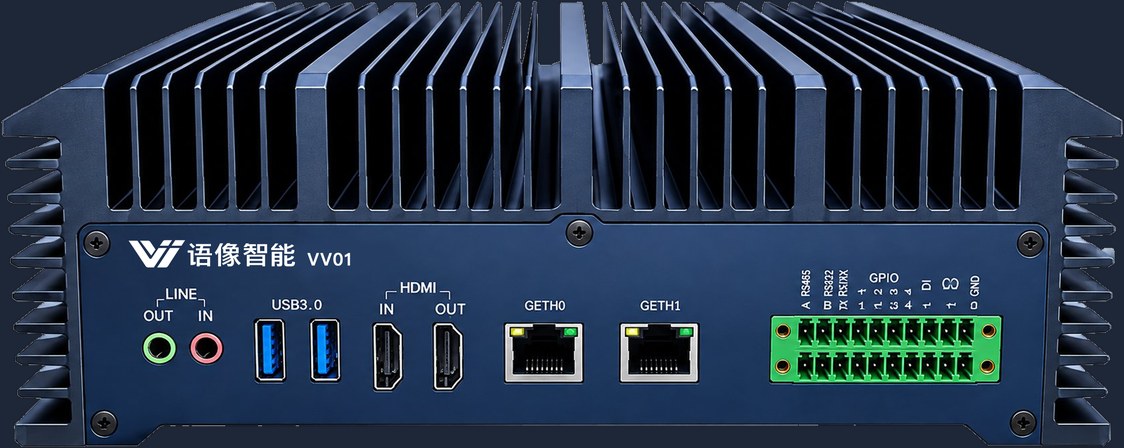
The Specific Hardware Configuration
| Item | Specification |
|---|---|
| Main processor | Octa-core 64-bit big.LITTLE: 4 × Cortex-A76 + 4 × Cortex-A55 @ 2.4GHz |
| AI compute | 46 TOPS (on-device NPU) |
| Memory / VRAM / storage | 8GB / 10GB / 128GB |
| Wired / wireless | 2 × RJ45 Gigabit Ethernet / Wi-Fi 6 |
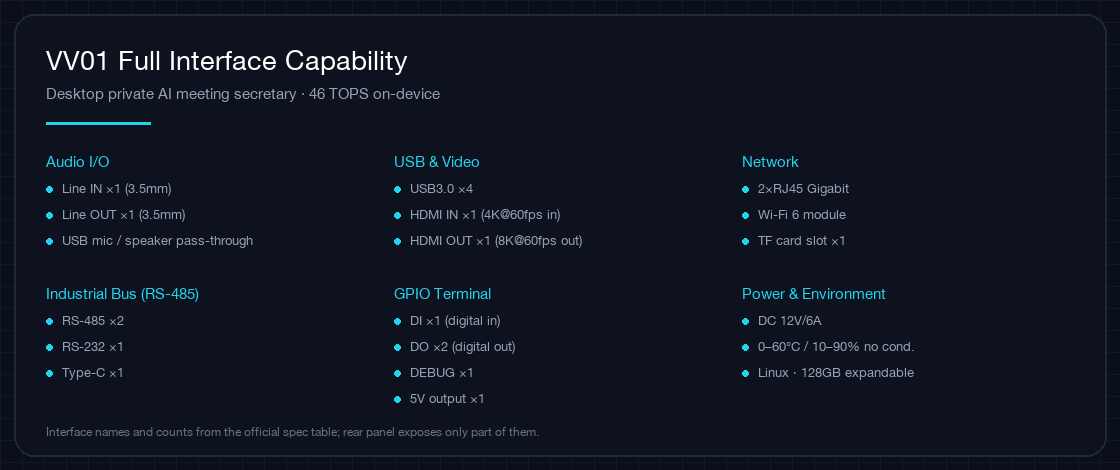
| Video I/O | HDMI IN × 1 (4K@60fps input), HDMI OUT × 1 (8K@60fps output) |
| Audio I/O | Line IN × 1, Line OUT × 1 (standard 3.5mm) |
| Other I/O | USB 3.0 × 4, RS-485 × 2, RS-232 × 1, TF card slot × 1, Type-C × 1 |
| Power / environment | DC 12V/6A; 0–60℃, 10%–90% non-condensing |
| Operating system | Linux |
What 46 TOPS actually means: TOPS measures how large a model a device can run. In a box the size of VV01, that figure means transcription, translation and summarisation all run as local inference — no audio sent to the cloud, no waiting on a round trip.oning** No need to send audio to the cloud and wait for the results.
How the End-to-End Latency Breaks Down
First word recognition delay ≤ 800ms → first word appears on screen
end-to-end recognition delay <1 second → complete sentence → summary/translation generation completed
Both determined by local reasoning only -No upload, no queue, no return, so No matter how bad the network is, it will not affect the delay.. This is the most essential difference between it and the cloud solution.
The Three Technical Details That Set VV01 Apart
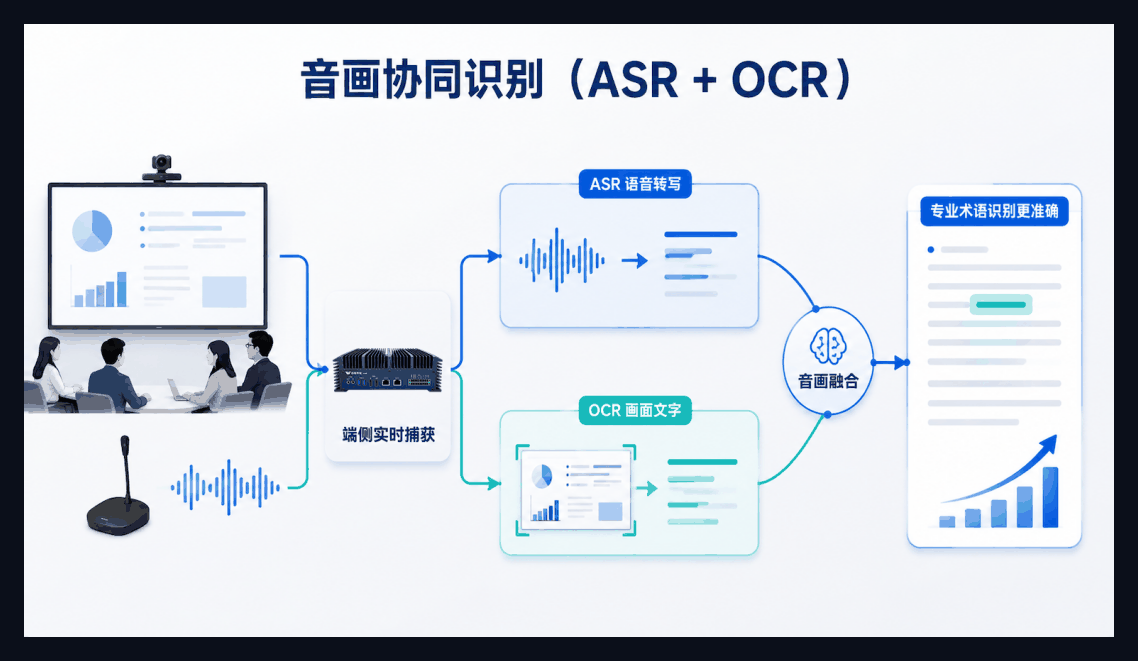
① Sound-and-Picture Collaborative Recognition (ASR + OCR): Why It Improves Terminology Accuracy
on-device can capture and analyze shared screen in real time, fusing the speech channel with what is read from the imagetion and picture text.
This addresses a very specific pain point: in a technical proposal, tender or review meeting, what is projected is usually slides and system parameters, and the model numbers, abbreviations and metrics on them are often more accurate than what people say aloud. If nobody utters a term during the meeting,he product model, abbreviation and index inside Often more accurate than people say. If no one reads the term at the scene, pure ASR will turn wrong. But OCR saw the screen casting picture, the term can be made up.
The result: OCR materially improves the transcription accuracy of technical terms.
For VV01, the HDMI IN interface is originally connected to screen casting equipment-the same interface also has the term source incidentally.
② USB Microphone/Speaker Pass-Through: What Problem It Solves
After the USB audio device is connected to the host, two-way audio forwarding works over a USB data bridge:
- Uplink: local microphone audio is fed to the PC as its conference input while the host captures the same audio for transcription.
- Downlink: remote conference audio is played out through the local speakers and captured at the same time
The point: it gives you complete two-way audio for the whole meeting — what the far end says is both audible and captured in the minutes.
③ Reliability and Self-Healing: Which Failures It Prevents
| Failure mode | Recovery mechanism |
|---|---|
| Front-end or back-end process dies | Automatically restarted |
| Network drops | Automatically reconnects |
| System exits abnormally | Unfinished sessions resume automatically, with everything already recognised fully retained |
| Upgrade fails | Automatic rollback — the current version is backed up first, disk space is checked in advance, and the upgrade package signature is verified before the upgrade proceeds |
| Meeting records | Written to storage on a timer and in real time |
The last one is what buyers care about most: after an abnormal exit, nothing already recognised is lost.
Industry Solutions: Deployment by Scenario
Scenario 1 — Standard Meeting Rooms and Small Discussion Rooms
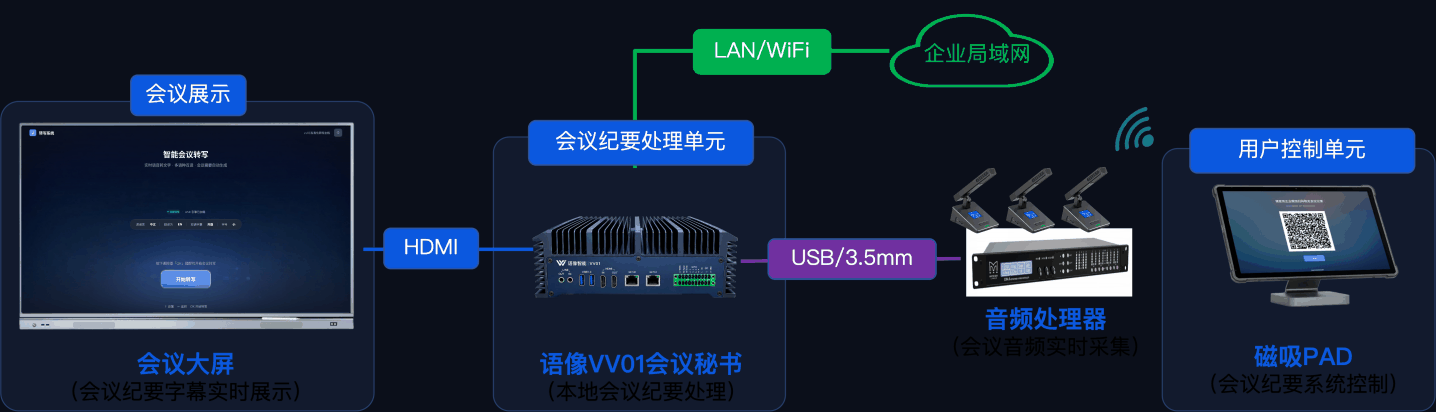
Typical setup: one VV01, an external omnidirectional microphone, and a large display or projector.
Flow: omnidirectional microphone capture → real-time transcription on-device → subtitles sent over HDMI to the large display → minutes and action items generated automatically when the meeting ends.t the end of the meeting.
Key point: HDMI OUT supports 8K@60fps, and switches automatically into subtitle-overlay mode when an HDMI input is detected — real-time transcription and bilingual subtitles are composited straight onto the incoming image, with no signal switching.scription/bilingual subtitles on the external input screen without changing the signal source.
Scenario 2 — Executive Offices and Individual Workstations
Typical setup: a VV01 with a USB microphone, or connected straight to the PC over USB pass-through.
Flow: USB microphone → host (which also serves the PC as its conference input) → on-device transcription → meeting records stay on the device.
Key point: take it away by QR code — once transcription ends, the large display shows a QR code that attendees scan to collect the meeting record; the code can be set to expire on a timer. In deployments that integrate with WeCom, the local recordings can be cleared automatically after a successful scan, according to a preset policy.pants will scan the code to obtain the meeting record; The two-dimensional code supports the countdown to automatically close. When docking WeCom and other scenes, the preset strategy can be followed after the code scanning is successful. Automatically clean up local recordings (Useful when compliance requires no original audio.).
Scenario 3 — Classified and Government Intranet Compliance
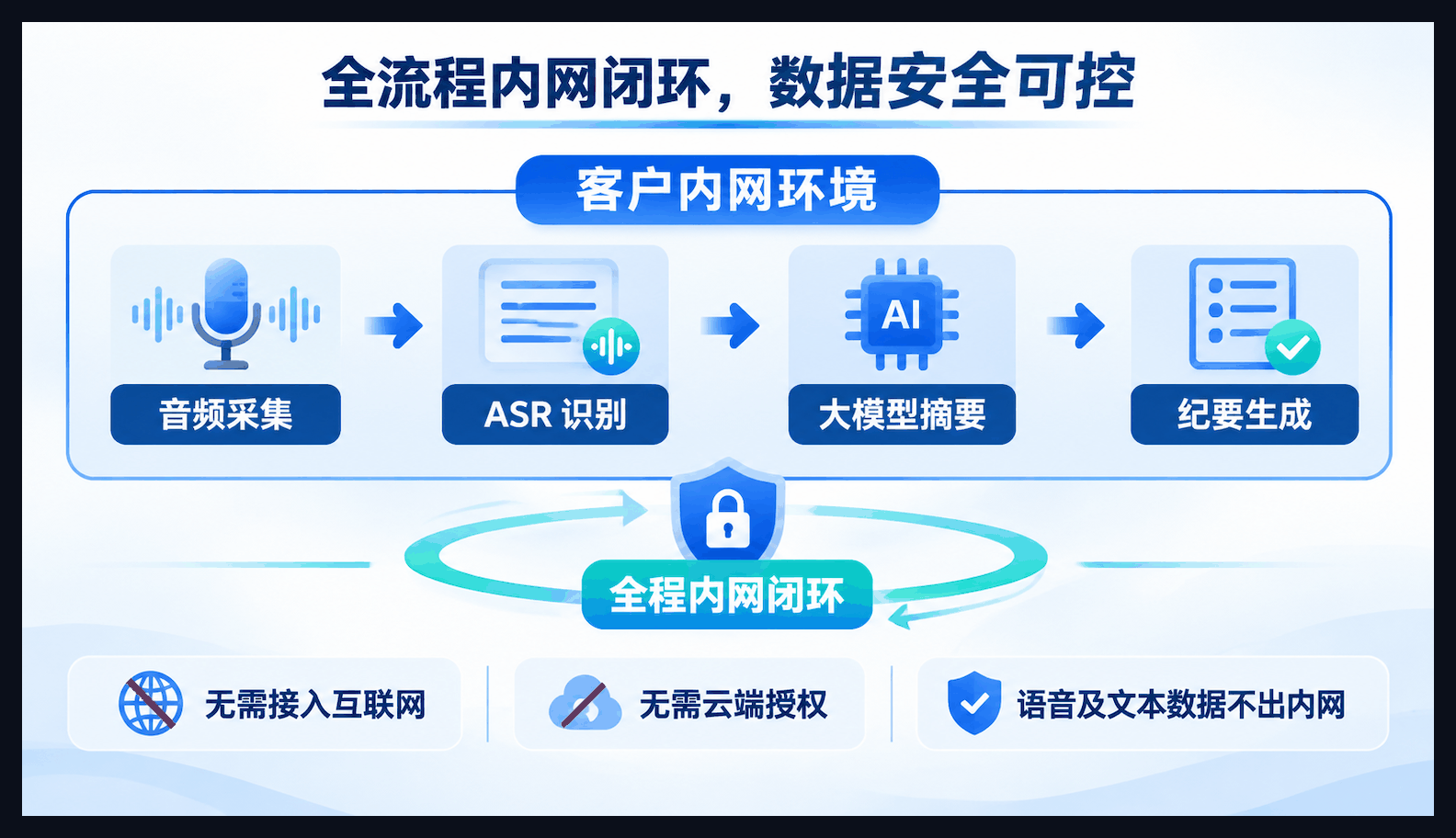
Typical setup: VV01 deployed on a physically isolated intranet, with no connection to the internet at all.
Key points of compliance:
- On-premise deployment: speech recognition, translation, minutes generation and other core capabilities with no internet access, without cloud authorization
- All voice and text data will not flow out of the intranet. -Xinchuang adaptation: has been adapted to mainstream Xinchuang CPU and domestic AI accelerator card, Complete model transformation and output equivalence check before delivery.
- Possesses the deployment capabilities required to support Level 3 Security Compliance and classified scenarios (whether Level 3 compliance is achieved shall be determined by the official assessment results).
Scenario 4 — Banking, Healthcare, and Other Terminology-Heavy Industries
Typical Configuration: VV01+ domain lexicon.
The method: import in-house terminology, product model numbers and abbreviations into the terminology base ahead of time, organised by domain.
The effect: the terminology base and hotword mechanism stop technical terms being mistranscribed; homophone-conflict clustering and phoneme-level hotword correction resolve words that sound alike but differ in writing; and AI-suggested hotwords put new terms into the review queue automatically.
Supporting capabilities:
- More than 30 preset industry summary templates, plus user-defined ones, to generate meeting conclusions and action items automatically
- Source-text polishing: automatically locates colloquial phrasing and wording slips — redundant clauses, scrambled word order, wrong terms, missing logical connectives, repeated slips of the tongue — then rewrites the sentence while keeping every key fact and the speaker’s original toneical connection, verbal error and repetition), automatically correct and reorganize sentence patterns, and completely retain key information and original tone.
Supporting Capabilities: The Web Console and Batch File Processing
The web console opens in any mainstream browser such as Chrome or Edge, covering device configuration, runtime status, minutes editing and meeting management.iting, and meeting management.
Live monitoring and browser-side control: watch the sentence stream of an in-progress meeting — speaker, timestamp, recognition status, translation — and edit online, undo edits, flag highlights, questions and action items, add notes, and end transcription from the browser.al time, support online editing, undo modification, mark key points/questions/to-do and add notes, and end transcription through the web page.
Usage statistics: transcription hours, document counts, meeting counts and participant totals, shown as bar and line charts, filterable by period and exportable.d and export.
Offline file transcription: supports wav, mp3, m4a, aac, flac, mp4, mov and other formats, with batch import and fast transcription at up to 10:1, plus Chinese–English translation and passage-level optimisation.t Chinese and English multilingual translation, passage optimisation and summary generation; you can configure the source language and target languages and summary templates according to files.
Transcript management: when a meeting ends, a Word-format transcript is generated automatically; a unified list shows start time, duration and topic, and each record’s document, audio, translation and summary can be viewed, downloaded or deleted.list, and support viewing, downloading and deleting recorded documents, audio, translation and summary.

Three Questions to Ask When Selecting a Model
① all the way enough? VV01 is a 1-way local transcribe. Parallel multi-conference rooms need to be connected to VV05(5 channels) or VV10(10 channels) and networked.
Is the ② site physically isolated? In a physically isolated environment, offline file transcription still runs at up to 10:1.
Is the term density of ③ high? High Term Density Scenario (Bank/healthcare/Technical Review) Be sure to match domain lexicon first. -This is the key action to change ≥ 98% from "enough" to "easy to use.
Product parameters are as listed on the official site at /en/products/vv01 and in the fact sheet.
FAQ
Q: What is VV01, and where does it fit?
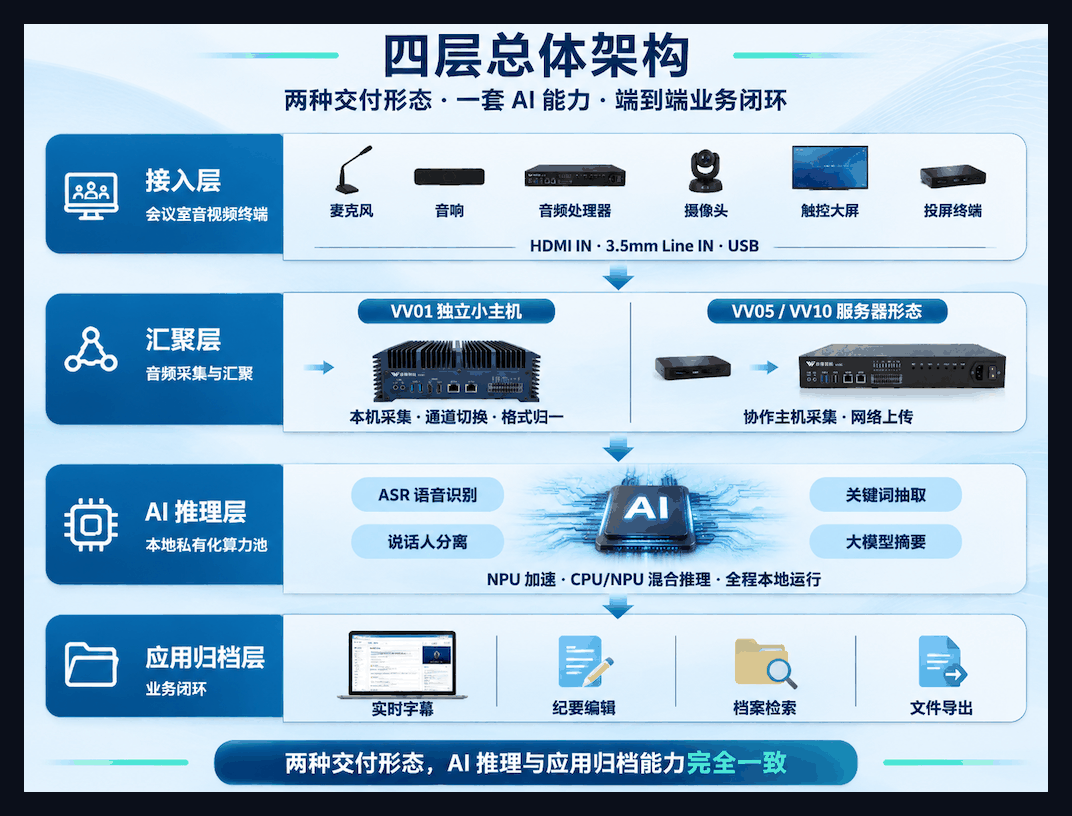
A: VV01 is VoiVision AI’s desktop-class on-premise AI Meeting Secretary host — a desktop appliance with one channel of local speech transcription. It suits a single meeting room or an individual workstation: a standard conference room, an executive office, a small discussion room. The core characteristic is that every capability runs locally on the host, with no networking, no cloud entitlement, and no audio or text leaving the intranet.
Q: What is the recognition accuracy of VV01?
A: In standard Mandarin and standard American English, speech recognition accuracy is ≥ 98%. Both qualifiers matter — accuracy differs for dialects and accents, and VoiVision AI has a dedicated retraining programme for more than ten Chinese dialects that is outside this figure. Recognition, translation and minutes generation all happen on the device, so the ≥ 98% figure holds without any network dependency.nt in dialect and accent scenarios, and VoiVision AI has a special retraining program for more than 10 Chinese dialects, which is not within the scope of this indicator.
Q: What latency can VV01 achieve?
A: First-word recognition latency is ≤ 800ms and end-to-end latency is under 1 second. First-word latency is the gap between someone starting to speak and the first character appearing on screen — the metric that most determines whether transcription feels like it keeps up. End-to-end latency covers the time from the end of an utterance to the finished transcript or minutes being ready, and is measured end-to-end through the full model pipeline, not per stage.t word on the screen, which is the most important indicator of "keeping up with the feeling" in the meeting scene; end-to-end refers to the finished transcript or minutes being ready once an utterance completes. Both are local reasoning decisions and are not affected by network conditions.
Q: Does VV01 need to be connected to the Internet? Will the data go out of the intranet?
A: No. Core capabilities — speech recognition, translation, minutes generation — need no internet access and no cloud entitlement, and all speech and text data stays inside the intranet throughout. Recognition accuracy, translation and minutes are all produced on the host itself.e and text data do not flow out of the intranet throughout the process. speech recognition accuracy, translation, minutes all completed locally in the host.
Q: What does "sound-and-picture collaborative recognition" mean?
A: VV01 captures and analyses the shared screen in real time on-device, fusing what it hears with what it reads on screen. Put plainly: professional terms, product model numbers and abbreviations that appear on the shared display are picked up by OCR even if nobody says them aloud, and folded back into the transcript.cription and picture text. In layman's terms, product models and abbreviations that appear on screen casting can be recognized and supplemented by transcription results even if no one reads them out at the scene, thus significantly improving the transcription accuracy of professional terms. This screen casting PPT talk about technical solutions, screen casting system to see the parameters of the meeting is particularly useful.
Q: What languages and dialects does VV01 support?
A: It runs a real-time streaming ASR engine that covers more than 20 languages out of the box — Chinese, English, Korean, Russian, French and more — and also recognises ten Chinese dialects including Wu, Cantonese, Sichuanese and Minnan. On the translation side it uses a reinforced LLM translation engine supporting Chinese and other major languages.e with 10+ Chinese dialects such as Wu, Cantonese, Sichuan, and Minnan. The translation side is equipped with an enhanced version of LLM translation engine, which supports more than 15 target languages such as Chinese, English, Japanese, Korean, Russian, German, French, Spanish, etc. The translation direction can be flexibly selected according to a single meeting or a single transcription task.
Q: Can VV01 transcribe recording files offline?
A: Yes. It transcribes common audio and video formats — wav, mp3, m4a, aac, flac, mp4, mov — with batch import and fast batch transcription. Offline file transcription runs at up to 10:1, so ten minutes of audio or video takes about a minute. It supports multilingual translation, text optimisation and summary generation in Chinese and English, and files can be uploaded in batches through the web console with the source language, target language and minutes template configured per file.
Q: What are the hardware specifications of the VV01?
A: The main processor is a 64-bit eight-core big.LITTLE design — 4 × Cortex-A76 + 4 × Cortex-A55 — clocked at 2.4GHz. AI compute is 46 TOPS; memory, VRAM and storage are 8GB, 10GB and 128GB. Interfaces: 2 × RJ45 Gigabit Ethernet, Wi-Fi 6, HDMI IN × 1 (4K@60fps input), HDMI OUT × 1 (8K@60fps output), 3.5mm Line IN and OUT, USB 3.0 × 4, RS-485 × 2, RS-232 × 1, a TF card slot and Type-C × 1. Power is DC 12V/6A; operating temperature 0–60℃ and humidity 10%–90% non-condensing; the operating system is Linux.
Q: How do you connect an external microphone and speakers to VV01?
A: Audio input supports three methods, switchable manually: 3.5mm Line IN, USB microphone, HDMI IN. Audio output supports three channels, each usable alone or in combination: HDMI OUT, 3.5mm Line OUT and USB speaker. USB microphone/speaker pass-through works in both directions as well."dividually or freely combined: HDMI OUT, 3.5mm Line OUT, and USB speaker. In addition, USB microphone/speaker bidirectional transparent transmission is supported — USB audio equipment connects to the host for bidirectional audio forwarding over a USB data bridge: upstream transmits local microphone audio synchronously to PC as conference input, and at the same time the host captures it locally for transcription; downstream sends the remote conference audioe to the local speaker for external playback while being captured at the same time, giving complete two-way audio for the whole meetinge.
Q: How are hotwords and the terminology base managed on VV01?
A: It supports term management, batch import and domain classification across general, technical, product, healthcare and banking vocabularies, and reports hotword hit rates. AI-suggested hotwords can be reviewed manually with auto-approval rules, homophone conflicts are clustered automatically, and phoneme-level hotwords can correct otherwise ambiguous terms."tatistics of hot words. Support AI candidate hot word extraction, manual review and automatic approval rule configuration; Support homophonic conflict aggregation and phoneme hot word error correction; Hot word injection strategy can be customized, support the configuration of single-session conference injection upper limit, sorting basis, and zero hit hot word automatic weight reduction rules.
Q: Will VV01 lose the meeting minutes if it fails?
A: There is a reliability and self-healing layer. If the front-end or back-end process dies it is restarted automatically; if the network drops, the device reconnects on its own; meeting records are written to storage on a timer and in real time, so after an abnormal exit an unfinished session can be resumed with everything already recognised intact. Upgrades are protected too, so a failed update rolls back rather than bricking the unit." is disconnected, automatic reconnection is supported. Meeting records support timing/real-time database drop. After the system exits abnormally, unfinished sessions can be automatically recovered and identified contents can be completely retained. The upgrade is also protected: the upgrade package uploaded by the Web terminal is upgraded online (large file slice transmission, breakpoint resume transmission, and upgrade status visualization), with built-in upgrade package signature verification, pre-check of disk space before upgrade, automatic backup of old version, and automatic rollback mechanism for upgrade failure.